We’re excited to announce the launch of the new Estimates feature. You can now create, send and manage estimates within your Harvest account. Like the Invoice feature, Harvest lets you create a professional estimate with just a few clicks, and everything is organized in a easy-to-scan dashboard for you to track what is outstanding, what has been recently accepted or declined:
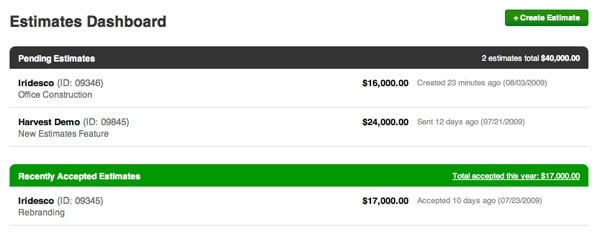
Here’s a highlight of cool things you can do with the new Estimates feature:
- Your client can access the estimate via a private URL, where they can accept or decline the estimate.
- Attach files to your estimate – and your clients can download online (via the private URL). No more emails with bulky attachments! Your client will simply receive one simple email with a link to view and download everything.
- Just like the Invoice feature, you can customize and translate every phrase on the estimate (via Estimates > Configure).
- Once an estimate is accepted, you can turn it into an invoice with just one click.
To start using the new Estimates feature: Go to Manage > Account Settings, and you’ll find a new Customize Modules section. Click on “Choose Modules” and you can activate the new Estimates feature.
Just a reminder: the “project estimate” feature has been renamed to “project budget“.
We hope you find this new feature useful, and please let us know if you have any questions or feedback!



49 Comments
A.Fruit / 03 August 2009
Awesome. Great work guys.
Gahlord Dewald / 03 August 2009
If they accept the estimate, and I generate an invoice (say, first 1/4 of the estimate as a project deposit) and they pay it: can I then charge hours against their pre-paid account?
Nikc / 03 August 2009
dear harvest, please be more projecty, instead of more accounty. thnxbai.
Jake Camara / 03 August 2009
Guys, this is fantastic. The very week I was looking to find a more comprehensive system, you rolled out just the feature I needed.
Well done.
Renato Carvalho / 03 August 2009
That’s why love Harvest, you guys never stop to provide tweaks and new features.
Lars Plougmann / 03 August 2009
Good comment from Nikc above. Please take a good look at Freshbooks and then focus on doing stuff that Freshbooks are not doing.
Jason / 03 August 2009
Great! It seems like the logical thing would be to be able to create not just an invoice with an accepted estimate.. but also a project? Right?
1. Create estimate
2. Estimate is accepted
3. Invoice goes out
4. New project is automatically created to track time against…
Keep it up!
Jason
Josef Larsen / 03 August 2009
As said in email to staff..
I would like to have the posibility to create an estimate based on a project. (only counting billable budget hours)
Stefan Bean / 03 August 2009
Another thing that would be great to add to this is a place to enter a detailed description before the pricing. We do estimates with detailed descriptions of the services we will be offering, then we give pricing. This usually comes before all of the prices. Right now, we wold just have to type that info into the box where the price is and that could get combersome when you have logos, web, branding, stationery, printing, etc. etc. Any way you could add a description field at the beginning of this so we can add descriptions like these?
Danny Wen / 03 August 2009
Thanks to everyone for submitting their thoughtful comments thus far. You can be sure we’re listening and in some cases have followed up for more details. Keep the feedback coming!
Cato Storm / 03 August 2009
Thanks guys,
We at OKB are very impressed by the speed and frequency of your updates of new improvements.
This new functionality will give us ONE PLACE to gather all the estimates and offers that used to be shattered around in mailboxes, fileservers and in best case Basecamp or Highrise. It also gives us an excelent tracking of customers approval of estimats and offers.
BUT, this will raise the bar for the “CRM functionality” withing Harvest in regards to multiple contact information, document storage and so forth… We are excited to see whats coming.
Keep up the good work.
Best regards
Team OKB
(Norway)
BoonBaseDesign / 04 August 2009
Thumbs up guys (and girls)!
George / 04 August 2009
After testing this out, there’s just two small things I have to note (other than that it’s very good):
1. Translations for “Accept Estimate”, “Decline Estimate”, and “File Attachments” are not possible. Can we get those added to the customization of texts?
2. Optimally, when a client accepts an estimate, a project should be created with the amount of hours that have been estimated for each task. This would streamline the process much more.
If you really want to push my buttons, you’d also add the ability to have HTML in the e-mails that are sent out to the clients, but that is definitely not a priority…
George / 04 August 2009
Just want to reformulate that last point better:
Instead of “Create Invoice” after a client has accepted the estimate, it should be “Create Project”, or that should be added as an option.
For some companies it might be natural to just send an invoice, but I’d think for most it would be more natural to set up a project and then start logging hours on it after a client has accepted.
Josef Larsen / 04 August 2009
I totally agree with George. Thats more natural for us. We never invoice until the project is finished.
Estimate -> Project -> Invoice
BoonBaseDesign / 04 August 2009
Tested it out now with a new client, worked fantastic!
I also agree with George and others – you must be able to convert the approved estimate into a project, and later to an invoice. Had me scratching my head for awhile.
Casper
alrasbi / 04 August 2009
For us we do the following:
Estimate -> Invoice 50% -> Work 50% of Project -> Invoice 25% –> Work 50% of Project -> Invoice Final 25%
Jason / 04 August 2009
Yes, we do the same model as alrasbi in regard to how we invoice…
Peter Markatos / 04 August 2009
Good, but an estimate is a range of costs not a fixed fee. You really need to make this so that it can be a variable quantity.
We always give estimates cause its too risky to say something is going to cost X. You risk losing the bid, or charging too little. Ranges are better practice.
Can you guys make this simple change? Would be VERY HAPPY if you did, cause our system now is very antiquated and this would be a HUGE help.
Peter Markatos / 04 August 2009
Also would be awesome if we could line item based on the tasks we have already programmed into Harvest. Then once an estimate is approved these values could pipe into Project Budget perfectly.
That would be sweet.
Peter Markatos / 04 August 2009
Sorry here’s another idea. There’s no way to have markup in here. Ideally this is something you can wrap in internally then take out in regards to what the client sees.
I’ve brought this up before, Harvest doesn’t track Profit only hard costs. So there’s no way to see how much we made above hard costs….which is really the “HARVEST” of a job.
I guess for now “TAX” could sorta function like that. but that’s a hack job.
Doug Steinberg / 04 August 2009
Would be great GREAT to duplicate an estimate. Its a bit tedious right now…
Shawn Maida / 05 August 2009
This is a great start. Thank you so much for your efforts. One question.
Would it be possible to have estimates pulled into the reports overview screen? That screen is so useful to me and it would be fantastic to have an “Estimates Summary” that mimics the invoices summary.
Maybe something along the lines of:
“Estimates sent this month”
“Estimates sent last month”
“Estimates won this month”
“Estimates won last month”
Troy Henson / 05 August 2009
I an sure you guys have estimate updates to come, but I wanted to raise my hand for the “duplicate estimate” request
Thats for the great estimate start!
Josef Larsen / 06 August 2009
Yes, estimate summary would be great on the reports overview page!
How about moving “harvest news” down below, and put the estimates in the right column instead? The news is the least important things on a daily use basis, IMO.
Jessica / 07 August 2009
I was hoping for a different kind of ‘estimate feature’.
When budgetting, I would like to be able to add (per task):
- billable budget (already possible)
- internal budget (in case you are willing to make an investment on the project/projectphase)
When tracking progress, I would like to be able to enter Estimate to Completion.
This way you get:
Billable budget + internal budget = total budget available for the project manager.
Then track Actual hours + estimate to completion and compare it to the available budget
Josef Larsen / 07 August 2009
Hi again. I have now used this new feature for 4 days, since launch.
And I still feel like there need to be some kind of connection or reference between an estimate and a project. I cant say exactly how this should be done, thats where you guys at Harvest knows best.
For me, this would be logical:
1. Create a project. Add tasks and budget for those tasks.
2. Create an estimate to send to a client, that estimate should be based on the already inputed budget hours.
3. Work and track time.
4. Create an invoice to send to a client, based on the worked hours.
Because an estimate and an invoice are quite similar! They are only based on different things in the project: Reported hours (or hours I want to be paid for) and budget hours.
I allways create a project first. Because time spent on trying to get a project, the sell-phase, should also have tracked time (even if its unbillable). That way I can see the whole economy, and thus know how much time to invest.
Or, maybe Im doing things wrong? What are your thoughts about how to work with estimates, projects and invoices?
Erik Vold / 09 August 2009
This is a really great feature guys! thank you.
rick oconnor / 12 August 2009
Definitely a great addition!
I think we’re going to be waiving goodbye to highrise!
Keep the awesome updates coming!
Brian / 17 August 2009
This is a great addition to Harvest that has already helped me. I sent an estimate to a new client with an attached contract, the estimate was accepted, I converted the estimate into an invoice for the initial payment, and the client paid the invoice via PayPal — all on the same day. A great way to sign up a new client!
An additional feature that would help me with this workflow would be a way to get a contract signed and store it in Harvest, or in an application linked to Harvest. In this case, after the client reviewed and accepted the contract that was attached to the Harvest estimate, I re-sent the contract for e-signing through EchoSign. Having some integration with that process would be excellent.
Troy / 17 August 2009
I agree with Brian, We need a way to have client’s sign off on T&C along with the estimate, and storage would be great too!
Brock Foreman / 17 August 2009
Just what I was looking for.
baz / 18 August 2009
Love it! But I can’t use it. I must have a client signature line, as well as client’s name, company, and date. Or else, it’s just a pretty picture. Thanks for thinking ahead, tho. Hoping the updated version offers those fields for client info & signature.
Toby Dyson / 20 August 2009
perfect, thanks for listening harvest. One other useful feature to the estimate would see the ability to not only link it to a certain client but also to a certain project from within that client. If the project hadn’t been created prior to estimating then perhaps from the drop down menu you could choose ‘link new project to this client’
Thanks
dario marquez / 28 August 2009
i signed up thinking i would need to compromise on not being able to make Estimates, so this is just awesome .. you should update your website asap as it’s not yet in the features list .. great app !
Daniel Draper / 08 September 2009
LOVE the estimates feature. I have been looking for something to provide this functionality for ages.
Only suggest I have is to be able to send an estimate as a PDF in the same way that you can now with invoices.
Keep up the good work!
Richard Banfield / 09 September 2009
Very exciting upgrade. Thanks for listening.
Scott / 09 September 2009
Why does the estimate not automatically pull from our rates/service lines? In other words, I would like to create an estimate and select: Design (20 Hours) & have those twenty hours map to hourly rate. Example of line items for an estimate:
- Project Management
- Design
- QA
- Art Direction
- Production
The beauty of this would be that if an estimate is approved, it can then seamlessly turn into a project with all project hours already setup.
Kelli Lewis / 09 September 2009
Love this! Just gave it a whirl, and it’s exactly what I’ve been looking for — will save me lots of time, and helps keep it all under one roof. Also, love that I can attach a contract to the estimate. Wonderful! I will continue to sing the praises of Harvest. Keep up the great work, Harvest Friends!
Michael Moore / 09 September 2009
Great stuff – I used it for the first time today and it was easy-peasy.
One idea for improvement: I like to do the estimate in a (roughly) chronological order, and then at the end I realize I’ve forgotten something that belongs in the middle. Right now there’s no easy way to say “Move this line UP” or “Stick a new line in HERE” Not a huge deal, more of a 1.1 refinement.
Thanks again for a great service.
Danny Wen / 11 September 2009
@Michael thanks for the suggestion — we’re making a note about this!
Jerome Wilson / 28 October 2009
“Once an estimate is accepted, you can turn it into an invoice with just one click.”
That’s fairly obviously missing a fundamental step, as has been mentioned by a few people. Surely it would make much more sense to turn it into project(s)? It would seem to map well.
Danny Wen / 28 October 2009
@Jerome We definitely hear you and we have these improvements on our list!
Jerome Wilson / 28 October 2009
Thanks Danny
Ursula / 12 February 2010
Darn, I was jumping up and down when I found this new feature and was all set to move our entire estimation process over to Harvest and then found that you can’t enter estimate ranges. Estimates are no good without ranges. Any news on an update?
Mads Katholm / 13 April 2010
I wound love to have a Status for my estimates.
Something like: “Pending”, “Accepted”, “Declined”, “Project created” and “Invoiced”.
Karen Schoellkopf / 13 April 2010
@Mads Katholm @Ursula Thank you both for the feedback, we’ve made notes on your requests for future updates of the estimate feature. Sorry, I don’t have a timeline to offer, but we do appreciate the suggestions!
Phil Austin / 28 April 2010
Our design services often include sub-consultants that have a budget we need to track in addition to our own. 2 additions that we are looking for the estimate feature to include are:
-the ability to query by type (ie. generate report of only one consultants fees and be able to see this for all estimates)
-for the report to list all the sub-categories that make up the total. (at a glance in the report tab, see additional columns that show fee breakdown)
mike russo / 09 August 2010
these are awesome features but the ability to estimate a RANGE would be tremendous. I’m trying very hard to use Harvest for all of my needs here but doing flat rate estimates is brutal.