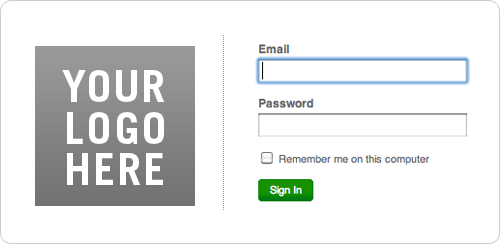
Meet the New Harvest Sign In Page

Your Logo Here

Our redesigned sign in page can now be customized with your company’s logo. This means that your employees and contractors will have instant recognition of your company branding, and they’ll feel reassured that they’re signing in to the right place.

Adding a logo (or other graphic element) is easy as can be – just sign in to your account and follow these simple steps:

  1. Go to Manage > Account Settings
  2. Click the Edit Preferences button
  3. Next to the “Logo” option, click “Choose File” and navigate to a file of your choosing.

The space for your logo is 160×160 pixels wide. Uploaded images may be smaller than that – and larger images will be resized. Please note that this feature is not currently available for free accounts.

We hope you like this new bit of customization, and let us know if you have any questions or thoughts about the feature.

10 Comments so far
  • nice and clean! the logo customization is a great touch.

  • Bryan Radtke May 17, 2010

    What a nice surprise that was when I logged in today. Very clean and professional look. Thanks.

  • Nice touch guys – it’s all in the details ;)

  • Brilliant idea guys!

  • When I opened the page up it was like a breath of fresh air! Thank you.

  • How nice! Feels official ;)

  • This was a cool surprise to see when I logged in today. Nice touch!

  • TBD Graphic Design June 3, 2010

    Nice. Now allowing that on the timesheet page would be great as well.

  • Nathalie McFadden June 4, 2010

    Is this option available for free account?

  • Carl Selfe July 7, 2010

    TBD Graphic Design has a good point. It would be nice if the logo was on the two main employee/consultant-facing input pages: The Timesheet page and the Expense sheet page. A constant reminder of from where the paycheck comes will help.

Leave a Reply

Your email address will not be published. Required fields are marked *

*

The HARVEST Blog News & small business tips from your beloved time tracking & invoicing app.