Upload Expense Receipts in Harvest

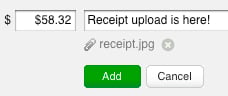
We’ve just added the ability to upload your receipts directly on the Harvest Expenses page. Until now, you needed to use the API or the iPhone app to attach receipt images to an expense, which was less than optimal for those of you who don’t use the iPhone app for your expense tracking.

This update to the Expenses page allows you to upload images or PDFs of your receipts, up to 10MB in size. We’ve also added a handy lightbox viewer for seeing your receipts quickly, as well as a link to print receipts right from your browser.

Coming soon, we will be implementing the ability to include receipts with invoices, but we thought we’d let you get first crack at this new development, so that you can get started in uploading your receipts!

We hope this is helpful, and please let us know if you have any feedback – we’re all ears!

16 Comments so far
  • Great feature! Much appreciated. The upload feature seems to consistently crash the latest Google Chrome Dev build for Mac (hey it’s a dev build). Just an FYI.

  • Ah, nice. Now to create a workflow between NeatReceipts and Harvest.

  • It would be great if the images uploaded would print on invoices when expenses are included!

  • Tom BUnger May 6, 2010

    Thanks. Have been eagerly awaiting this one! Is there a way the expense reporting could have a field for “vendor?” This would make it easier to track the transactions when we are reconciling accounts. We just went live this month… So far, so good!

  • Joe C. May 16, 2010

    Will there be a general Android App for Harvest and to support the receipts upload functionality?

  • This is great, but we’d much rather see multi-currency support with rates guys…

  • First off, thanks SO SO SO much for adding this feature. It’s literally shaved hours off my team’s weekly work.

    I have one open question about images though: Why does the iPhone app require that you crop receipts to a square shape? This is not at all helpful in any way I’ve found, and certainly can’t be an issue of controlling upload data sizes since I can upload far bigger files through the Web interface.

    Cropping receipt images has been hugely problematic for capture of larger size images, and instead requires me in those cases to capture through the iPhone camera, email to myself, then upload through the Web interface. Which, obviously, makes no sense.

    Thanks in advance for your help!

  • please create links between invoices generated from estimates, it’s such a basic feature, but it’s missing and creates a lot of back tracking headaches… for myself and clients

    also why are the subject lines abbrievated, there is space

  • Great addition. You guys do a great job of keeping this tool up to date. Looking forward to the addition of inclusion with Invoice. Thanks !

  • Debra Blackman May 29, 2010

    Yes, I’m looking for the connection between NeatReceipts and Harvest, too.

  • Ron Dovich June 4, 2010

    +1 for NeatReceipts integration.

  • Hi,
    Are there any plans to allow separate approval of expenses and time and also, any chance of a reject option for time / expenses so I can send back mistakes and then see when they are resubmitted.

    Thanks,

    Ian

  • Jake McKee June 16, 2010

    Any feedback on my question about cropping of receipts?

    Thanks!

  • cbrown July 23, 2010

    Good!!! This definitely moving in the right direction so far… Looking forward to being able to include vendor tag on the expense list as well as attach receipts to invoices.

  • deborah lathen August 6, 2010

    Yes, it would be great if you could link this to neat receipts.

  • I am also a neat receipts user and would love to see an integration between neat receipts software and harvest. Thank you

Leave a Reply

Your email address will not be published. Required fields are marked *

*

The HARVEST Blog News & small business tips from your beloved time tracking & invoicing app.