What Makes a Good Help Section?
A good help section is intuitive and efficient, allowing users to find answers quickly without the need to contact support. It should offer clear navigation, effective search functionality, and organized content that addresses user needs. According to customercontactweek.com, over 75% of customers prefer to resolve issues independently before reaching out to customer support.
Intuitive navigation is crucial. Users should not have to dig through layers of information to find what they need. A well-structured help section uses categories and subcategories that make sense to the user, not just the developer. This approach mirrors how IT departments streamline their support portals to deflect calls effectively and enhance user satisfaction.
A robust search function is another key element. It saves users time and frustration by allowing them to quickly locate relevant articles. Effective search functionality also includes autocomplete and error tolerance for misspellings.
Finally, content organization is essential. Content should be bite-sized and easy to scan, which can be achieved through the use of headings, bullet points, and concise language. This approach not only improves user experience but also aligns with the trend of proactive self-service, where companies aim to empower customers to resolve issues independently.
Best Practices for Creating a Help Section
Creating an effective help section involves several best practices, starting with intuitive navigation and comprehensive content. Ensuring that users can easily find information is paramount. A customer-centric approach should guide the design, focusing on real user needs rather than assumptions.
Firstly, organizing content logically is key. Group related articles into categories that reflect user journeys, such as "Getting Started" or "Troubleshooting." This logical segmentation helps users find what they're looking for without sifting through irrelevant information.
In addition to organized content, the use of multimedia can significantly enhance a help section. Videos, screenshots, and GIFs cater to various learning styles and make instructions clearer. For example, incorporating visual aids has become a standard in e-commerce, where customers expect instructions to be both engaging and easy to understand.
Another critical element is consistency in terminology and design. Users should encounter the same terms and layouts across all help pages, which reduces confusion and enhances usability. Consistency ensures that users can navigate the help section smoothly, regardless of where they enter.
Finally, integrating feedback mechanisms can provide valuable insights into how users interact with the help section. By analyzing this feedback, you can continuously improve the content and structure, ensuring that your help section remains effective and user-friendly.
Examples of Effective Help Sections
Real-world examples of effective help sections can provide inspiration and guidance for creating your own. Apple and Shopify are two companies that have excelled in this area by implementing best practices in their support sections.
Apple is known for its impeccable organization and extensive support resources. Despite having a vast array of products and services, Apple's help section is logically structured, making it easy for users to find specific information. Their use of multimedia content, such as videos and detailed guides, enhances user understanding and engagement, which is crucial for resolving complex issues.
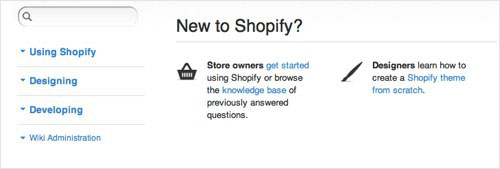
Shopify, on the other hand, focuses on making their help section scannable and easy to navigate. According to getmonetizely.com, Shopify uses icons, brief headings, and bolded keywords to enhance readability and reduce the time users spend searching for answers.
These examples highlight the importance of tailoring help sections to user needs through clear organization, engaging content, and a focus on usability. By studying these successful implementations, you can adopt similar strategies to improve your own help center, ensuring it serves as an effective tool for customer support.
How to Improve Your Help Center's Search Functionality
Improving your help center's search functionality is crucial for ensuring users can quickly find the information they need. A well-designed search function not only enhances user satisfaction but also reduces the load on customer support teams.
One effective strategy is to implement a predictive search feature. This tool anticipates user queries and suggests relevant content as they type, streamlining the search process. For example, many financial services integrate predictive search to help users navigate complex information quickly and efficiently.
Another tip is to ensure your search function is forgiving of typos and variations in search terms. Natural language processing can assist in recognizing user intent and delivering appropriate results, even when the search query isn't perfectly phrased.
Additionally, make sure your help center's content is indexed by external search engines, such as Google or Bing. This allows users to find your help articles directly from search engine results, meeting the needs of those who prefer this method of searching for information.
Finally, regularly analyze search data to identify common queries and any gaps in your content. Use this data to update and expand your help resources, ensuring they remain relevant and comprehensive. According to gainsight.com, organizations that frequently update their help content have seen improved customer satisfaction and reduced support costs.

Common Mistakes to Avoid in Help Sections
Creating an effective help section is crucial for user satisfaction, but it's easy to fall into common traps that undermine its effectiveness. One significant mistake is poor organization. Without a clear structure, users may become frustrated and abandon their search for help. To prevent this, ensure your help content is logically arranged with clear categories and subcategories. This makes it easier for users to navigate and find what they need quickly.
Another common pitfall is outdated content. As your products and services evolve, so should your help documentation. Failing to update your help section can lead to misinformation and increased support requests. Regularly audit your help content to ensure it reflects the latest product updates and customer feedback. According to hirehoratio.com, integrating feedback mechanisms can also highlight areas where content may need updating.
Lastly, overlooking accessibility can alienate a portion of your user base. Ensure your help section is compliant with standards like the Web Content Accessibility Guidelines (WCAG) to cater to users with disabilities. This approach not only broadens your audience but also enhances the user experience for everyone. By avoiding these common mistakes, your help section can become a valuable resource that reduces support costs and improves customer satisfaction.
Key Metrics for Measuring Help Section Success
To determine how well your help section is serving your users, you need to track key metrics. One of the critical metrics is user engagement. This includes the number of visits, the time spent on pages, and the click-through rates within your help center. High engagement often indicates that users are finding the content helpful and are actively seeking information.
Another important metric is the search success rate. This measures how often users find the answers they are looking for after performing a search. A low search success rate might suggest that your content is not effectively addressing user queries or that your search functionality needs improvement. According to customergauge.com, over 75% of customers prefer to solve issues on their own, highlighting the need for effective self-service tools.
Feedback analysis is also crucial. By examining user feedback, you can identify common pain points and areas for improvement. This might involve analyzing qualitative feedback from comments or using quantitative data from surveys. These insights can guide you in refining your help content, making it more relevant and effective. Ultimately, tracking these metrics will help you continually optimize your help section, ensuring it meets user needs and supports your business goals.
Integrating User Feedback into Help Sections
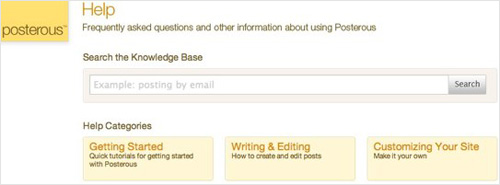
Incorporating user feedback into your help section is essential for maintaining its relevance and effectiveness. User feedback provides valuable insights into what users find helpful or confusing, allowing you to make targeted improvements. One way to gather feedback is through direct prompts within your help content, such as asking users if an article was helpful or providing options to leave comments.
A common misconception is that merely having a feedback mechanism is enough. In reality, the key is to actively analyze and act on the feedback received. For instance, if users frequently report that a particular help article is unclear, it's a cue to revisit and refine that content. According to zendesk.com, integrating feedback with analytics can help prioritize which areas to improve first.
To effectively integrate feedback, consider setting up regular review cycles where your team discusses and implements necessary changes based on user input. This not only improves the content quality but also demonstrates to users that their opinions are valued, fostering a more user-centric approach. By systematically incorporating user feedback, you can ensure that your help section evolves to meet the changing needs and expectations of your audience.
Mobile Optimization for Help Sections
Optimizing your help section for mobile devices is no longer optional—it's essential. With a growing number of users accessing help content via smartphones and tablets, ensuring a seamless mobile experience is critical. Responsive design is the first step; it ensures that your help section adapts to different screen sizes and orientations, providing a consistent experience across devices.
A common mistake is assuming that mobile users will engage with content the same way they do on desktops. Mobile users often seek quick, concise answers and may have less patience for scrolling through lengthy text. To address this, prioritize the most common questions in a mobile-friendly format, using collapsible menus and touch-friendly buttons. According to zappix.com, over 75% of U.S. consumers value quick service, highlighting the importance of efficient mobile help solutions.
Additionally, make sure that your search functionality is optimized for mobile use. This means having a prominent search bar that is easy to access and use with a touch interface. By focusing on these mobile optimization techniques, you enhance the usability of your help section, leading to higher user satisfaction and fewer support requests.
Frequently Asked Questions
What are the best practices for creating a help section?
The best practices for creating a help section include clear organization, intuitive navigation, and comprehensive content. Ensure that users can easily find answers through a well-structured layout and a powerful search function. Additionally, regularly update content based on user feedback and analytics to address common issues and improve the overall user experience.
How can I improve my help center's search functionality?
To improve your help center's search functionality, implement features like auto-suggestions, synonyms, and advanced filtering options. Ensure that the search algorithm prioritizes relevant content and can handle common misspellings. Additionally, regularly analyze search queries to identify gaps in your content and enhance the accuracy of results.
What tools can I use to build a help center?
There are several tools available to build a help center, including Zendesk, Freshdesk, and Help Scout. These platforms offer user-friendly interfaces, customizable templates, and robust knowledge base capabilities. Additionally, consider integrating chatbots and AI-driven solutions to enhance user support and streamline the self-service process.


