Skip to content

Agency Pricing

Draw tracked hours from upfront deposits without manual math

Hold client prepayments in an ongoing balance and deduct tracked hours directly when you generate an invoice. Any overage carries forward as an ordinary balance due, so your team never has to hand-calculate spreadsheet deductions.

  • Applies to a whole client or an individual project
  • Caps draws at the balance so overages stay due
  • Running ledger logs every deposit, draw, and unbilled hour
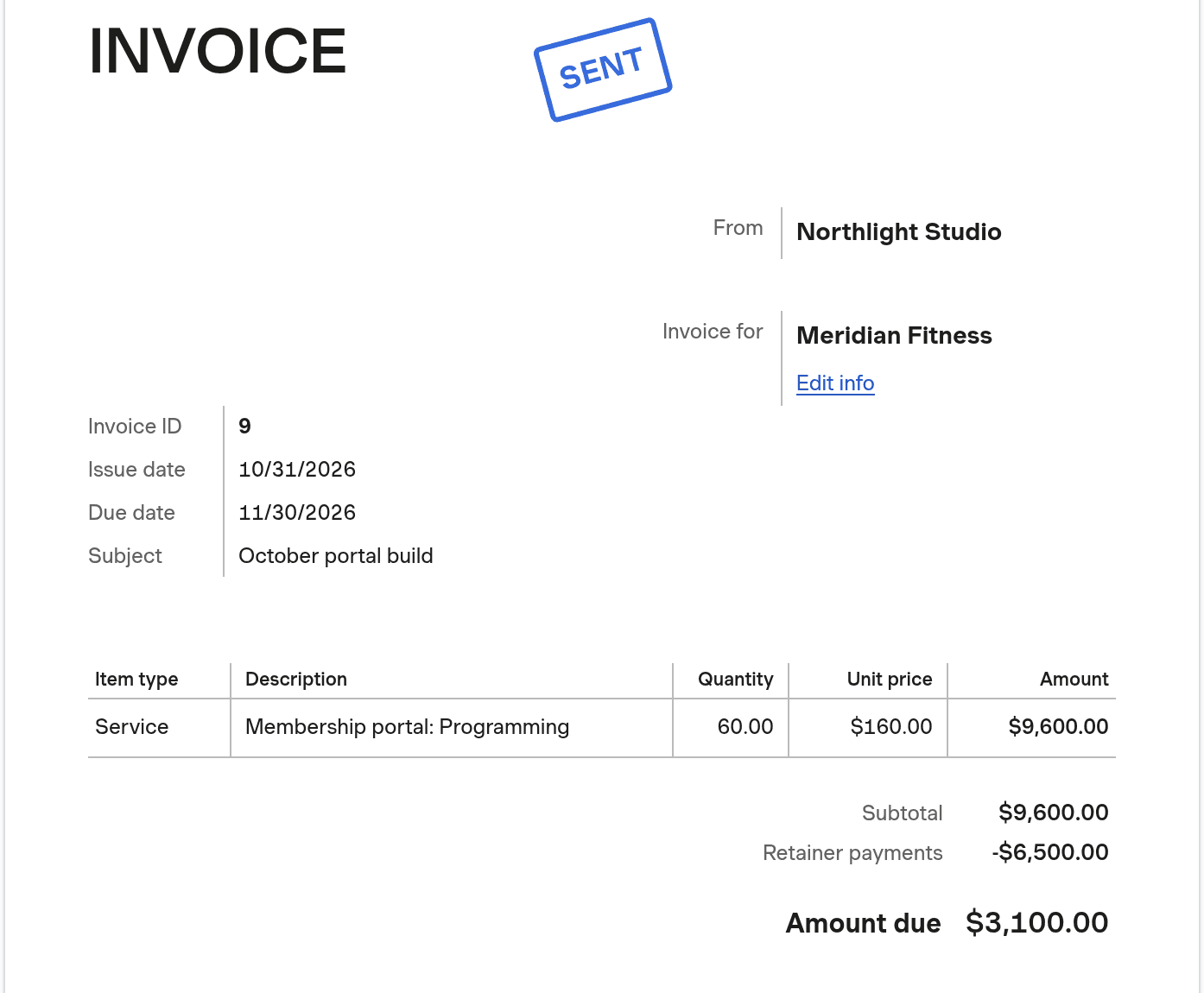
The saved invoice after a partial draw.

Reconcile upfront client deposits without side spreadsheets

When clients pay in advance, operations leads often spend the final week of the month cross-referencing logged hours against deposit spreadsheets and hand-editing invoice line items. Harvest Retainers holds upfront client payments in a dedicated balance, lets you draw down tracked time and expenses directly on billing drafts, and keeps unused funds ready on the ledger until drawn.

Where prepaid billing saves time

The last Friday of the month · retainer billing

Prepaid hours deduct from the invoice without manual math

Deduct prepaid funds without recalculating hourly rates or editing individual lines.

When creating an invoice from tracked time, tick to draw from the prepaid retainer. The deduction records as a payment directly on the invoice, letting you draw the full balance, the full invoice total, or an exact amount without adjusting individual hourly line items.
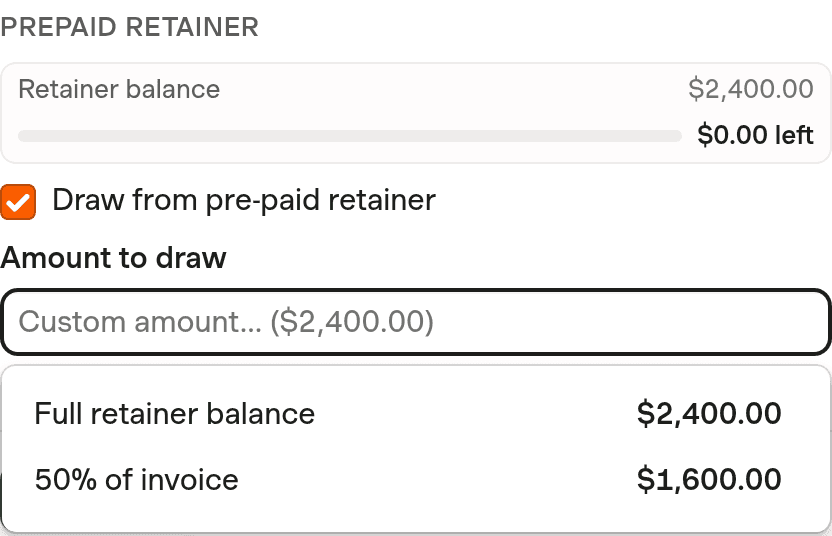
Prepaid funds applied directly to the billing draft

The Prepaid retainer card on the new-invoice page.

Billing review · logged work exceeds the deposit

Overages carry onto the invoice as a clear balance due

Show clients their deposit applied and the extra hours billed on the same document.

When the team tracks more time than the prepaid balance holds, Harvest caps the draw at the available funds. The overage remains as the invoice’s amount due, so clients see their deposit applied and the extra hours billed on the same document.

Overage amounts stay clear without separate supplemental invoices

The saved invoice after a partial draw.

Quarterly account review · auditing retainer burn

Unused funds stay on the ledger alongside unbilled work

Know what committed funds remain before the next billing cycle.

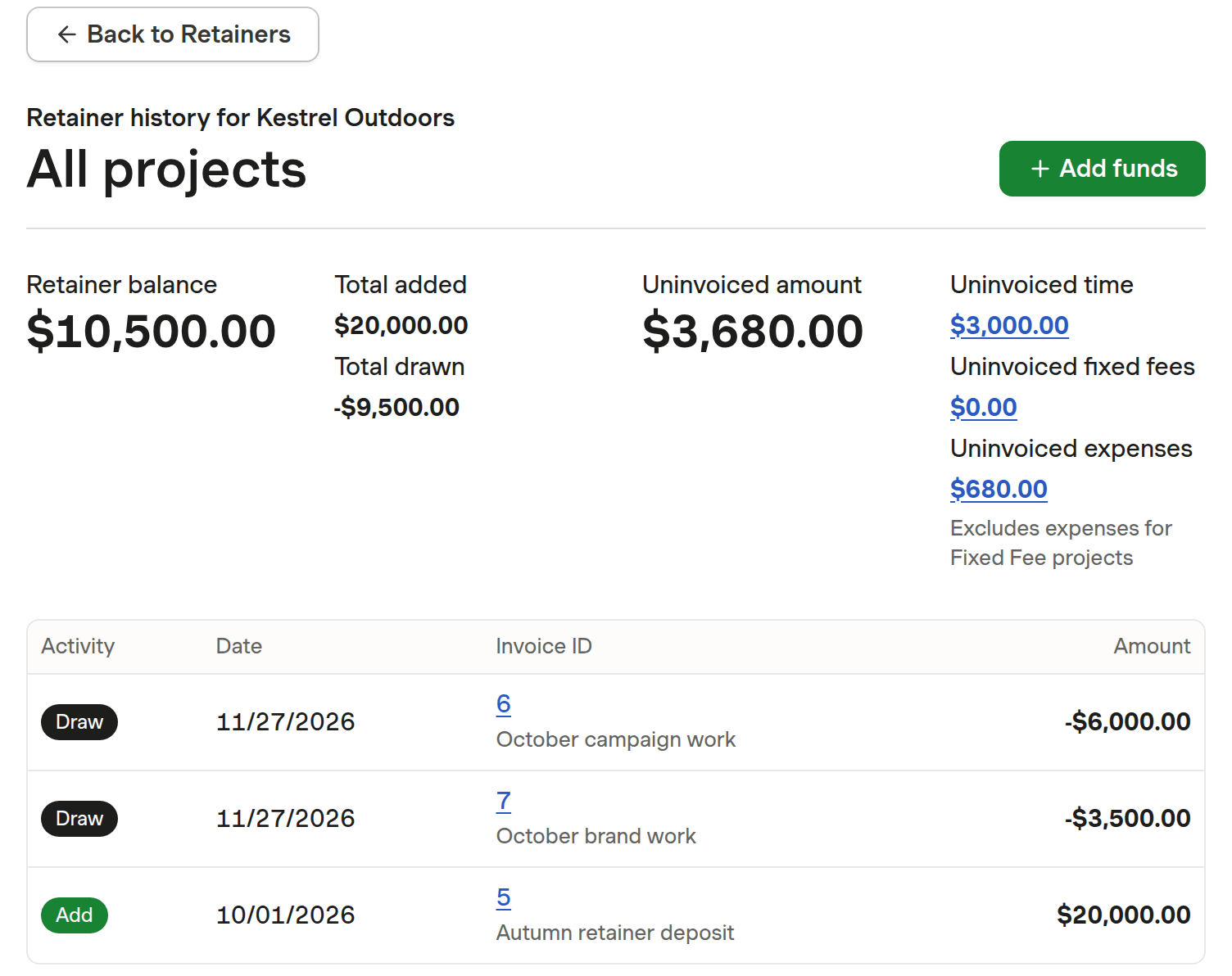
The retainer balance remains on the client ledger until an invoice draws against it. The retainer page tracks the running balance alongside uninvoiced hours and expenses across covered projects, so operations leads know what remains committed before the next cycle.

Real-time visibility into remaining funds and work in progress

A single retainer’s page.

How retainers work from deposit to closeout

  1. Set up the retainer

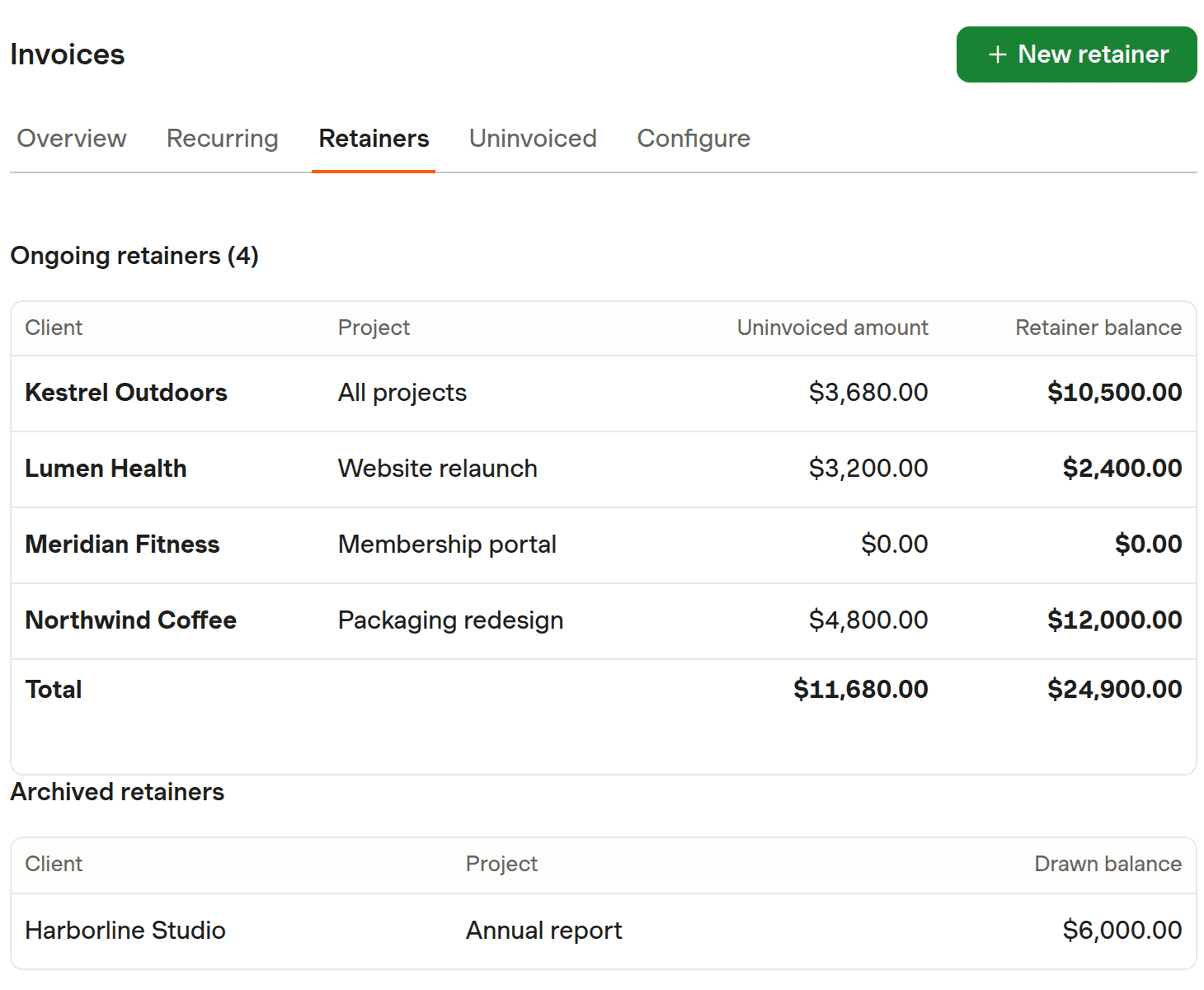
    From Invoices > Retainers, click New retainer, choose the client, and assign the balance to a single project or to all projects for that client.

    Invoices > Retainers.
  2. Fund it with a retainer invoice

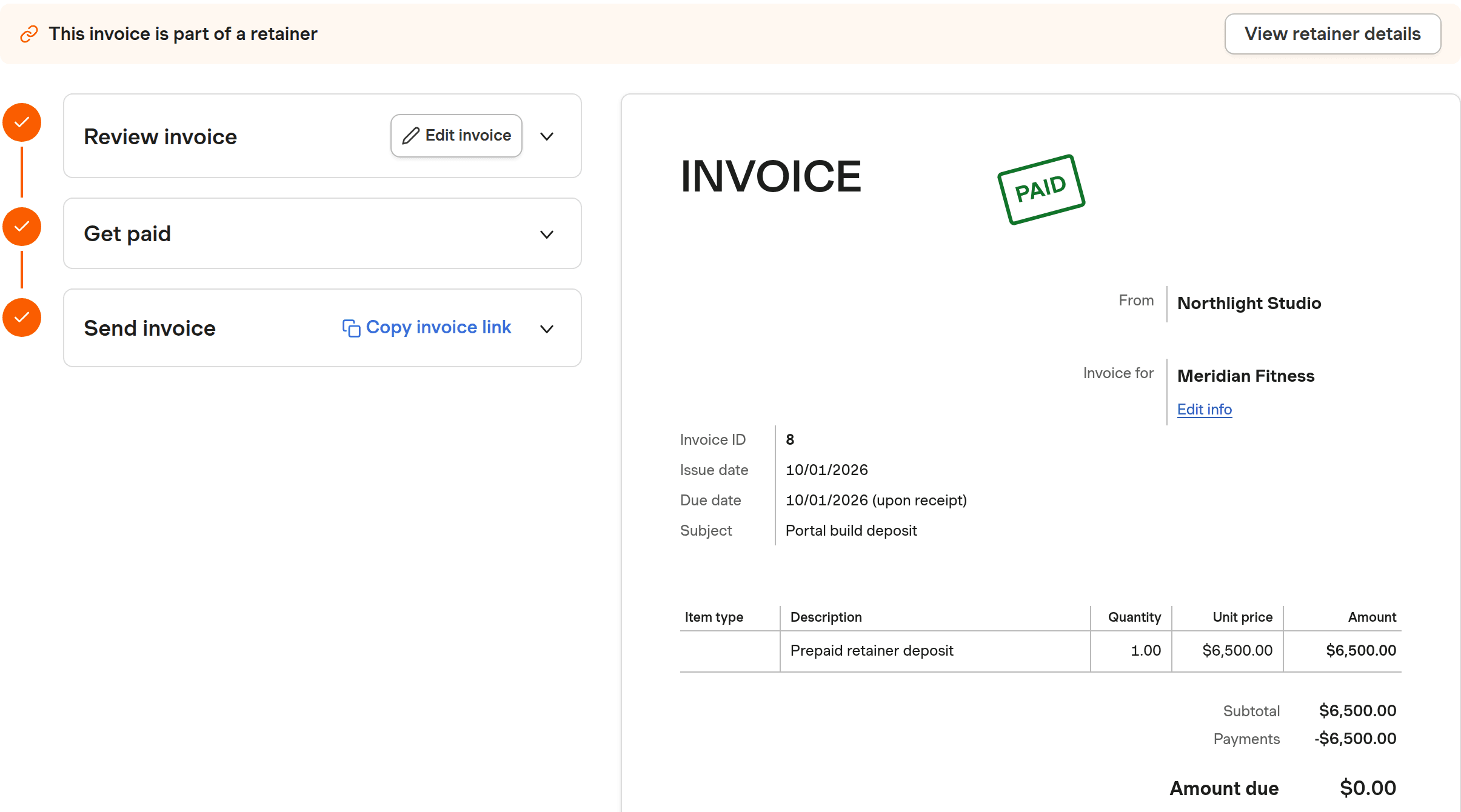
    Click + Add funds on the retainer page to create a retainer invoice. When your client pays the invoice, Harvest records the payment as a deposit credit on the retainer ledger.

    A retainer invoice (Add funds).
  3. Draw from the retainer on billing drafts

    Generate an invoice from tracked time, expenses or fixed fees, tick Draw from pre-paid retainer, and choose whether to apply the full balance, the invoice total, 50%, or a custom amount.

    The Prepaid retainer card on the new-invoice page.
  4. Bill overages as ordinary balance due

    Harvest records the draw as a payment on the invoice. If the deposit covers the entire amount, the invoice marks as paid; if the work exceeds the balance, the remaining overage stays due on that invoice.

    The saved invoice after a partial draw.
  5. Monitor unbilled time alongside remaining funds

    View the retainer page anytime to see your running balance, total added, total drawn, and the unbilled work tracked against covered projects.

    A single retainer’s page.
  6. Archive the retainer when finished

    Once the balance reaches zero and all work is complete, archive the retainer to clear it from your active list. You can restore it later if the client renews.

Clear rules for balances, overages, and access

  • Unused funds stay until drawn

    Funds remain on the retainer ledger ready to draw against future work until you draw against them or archive the retainer at a zero balance.

  • Overages stay on the same invoice

    A draw never exceeds the available balance. Any work beyond the deposit remains as an ordinary amount due on the invoice, without separate overage fees.

  • Defined permissions for your team

    Administrators create retainers and record deposit funds, while project managers with invoice permissions can apply retainer draws directly to billing drafts.

Frequently asked questions

What happens when tracked work exceeds the retainer balance?

The draw automatically caps at the available retainer balance. Any work beyond that balance remains due on the invoice, so your client sees the applied deposit and pays the remaining overage on the same document.

Why does the draw option not appear on an invoice draft?

The draw option appears only on invoices generated from tracked time, expenses, or fixed fees. Free-form invoices and recurring invoice templates do not offer retainer draws.

Can a retainer cover multiple projects for the same client?

Yes, you can create a client-level retainer that applies across all projects for that client, or create a retainer tied to one specific project. A client can have one active client-level retainer and one active retainer per project.

Agency Pricing

Manage agency retainers without spreadsheet reconciliation

Keep client deposits in a running balance and draw tracked hours directly on your billing drafts. Start your free trial to see how Harvest simplifies retainer billing.