

Getting payroll done should be as easy as tracking time and expenses. Gusto helps more than 500,000 businesses manage payroll, benefits, and HR. Harvest’s integration with Gusto connects the two, so the hours and reimbursable expenses your team tracks in Harvest go straight to Gusto, with no timesheets to keep in both.
With the integration, administrators can sync approved timesheets and reimbursable expenses directly from Harvest to Gusto, with hours already split into regular and overtime. That means no downloading spreadsheets or re-entering data, and less manual work before you run payroll in Gusto.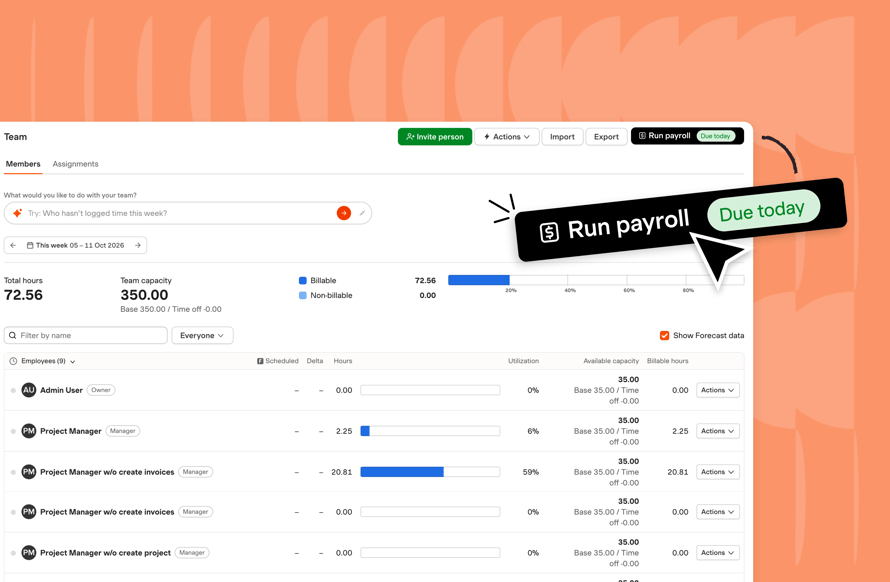

Match team members to Gusto
Link each person in Harvest to their Gusto employee or contractor profile once, and every sync sends their hours to the right person. Harvest also shows whether each employee is eligible for overtime, and never sends hours for exempt employees or owners, so their paychecks stay correct.
Preview before you sync
Before anything is sent, Harvest shows you exactly what will be sent to Gusto, what will be skipped, and why. Hours are skipped if a team member isn’t matched to Gusto yet, or if Gusto has already processed that pay period. The preview and the sync follow the same rules, so what you see is what gets sent.
Sync reminders and notifications
Set a weekly, semi-monthly, or monthly reminder so you get a nudge to run the sync ahead of payroll. On the day it’s due, a Run payroll button appears at the top of the Team and Approvals pages. When a sync finishes, Harvest emails you to say whether it completed successfully or failed, with a link to the full results.
Overtime and multiple pay rates
Harvest automatically splits each employee’s hours into regular and overtime, based on the federal 40-hour week, before sending them to Gusto for you to approve. For employees with more than one job in Gusto, you pick which job their hours go to, so they’re paid at that job’s rate.
Get started with Gusto
Already use Gusto? Connect your account to Harvest to get started. New to Gusto? Sign up through Harvest to get three months free.
