Skip to content

Fixed Fee Milestones

Billed on schedule across retainers and project milestones

Assign recurring monthly fees to retainers and dated payment stages to fixed-fee projects. When invoice day arrives, every amount due is already calculated and ready to bill together.

  • Pre-selects projects with fees due to date
  • Combines both billing schedules on one client invoice
  • Recognises earned revenue in monthly profitability
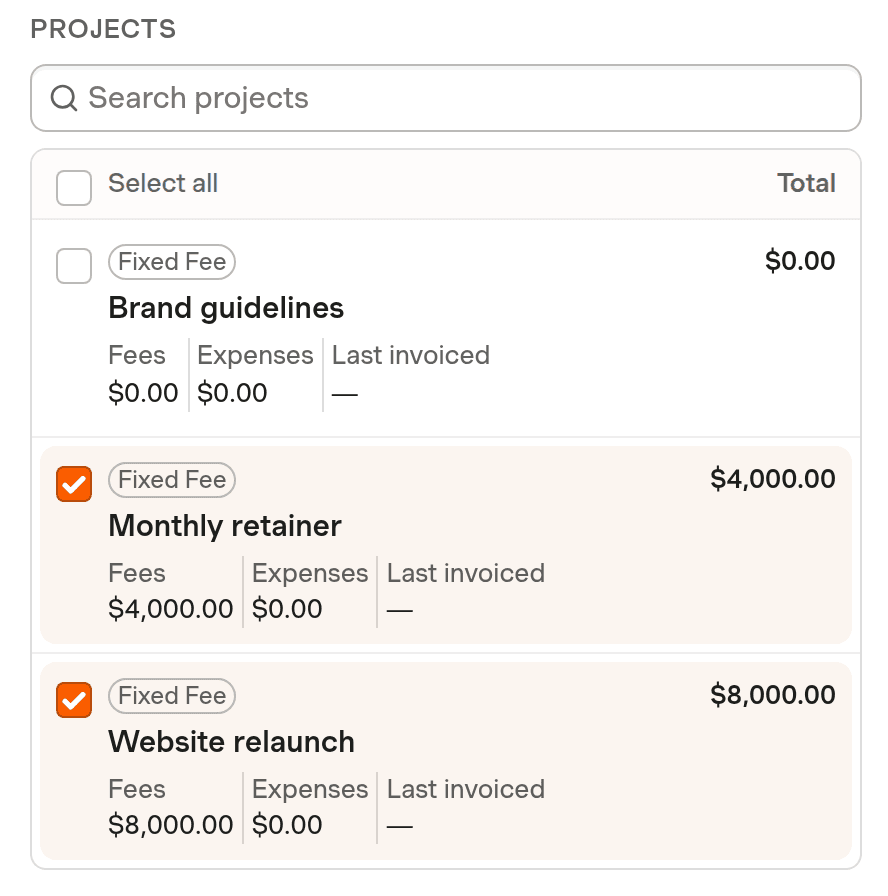
The project picker on the new invoice page for a client with a retainer and a staged project.

How it works

When you create an invoice for a client with an ongoing retainer and a staged project, Harvest checks what has accrued across both schedules. The project picker pre-selects projects that have fees due, and the invoice builder pulls in the retainer’s accrued balance alongside each started, uninvoiced milestone. Future stages stay off the bill, so you send one accurate invoice covering both contracts without cross-checking signed agreements or tracking payment dates in spreadsheets.

  1. Choose the billing schedule

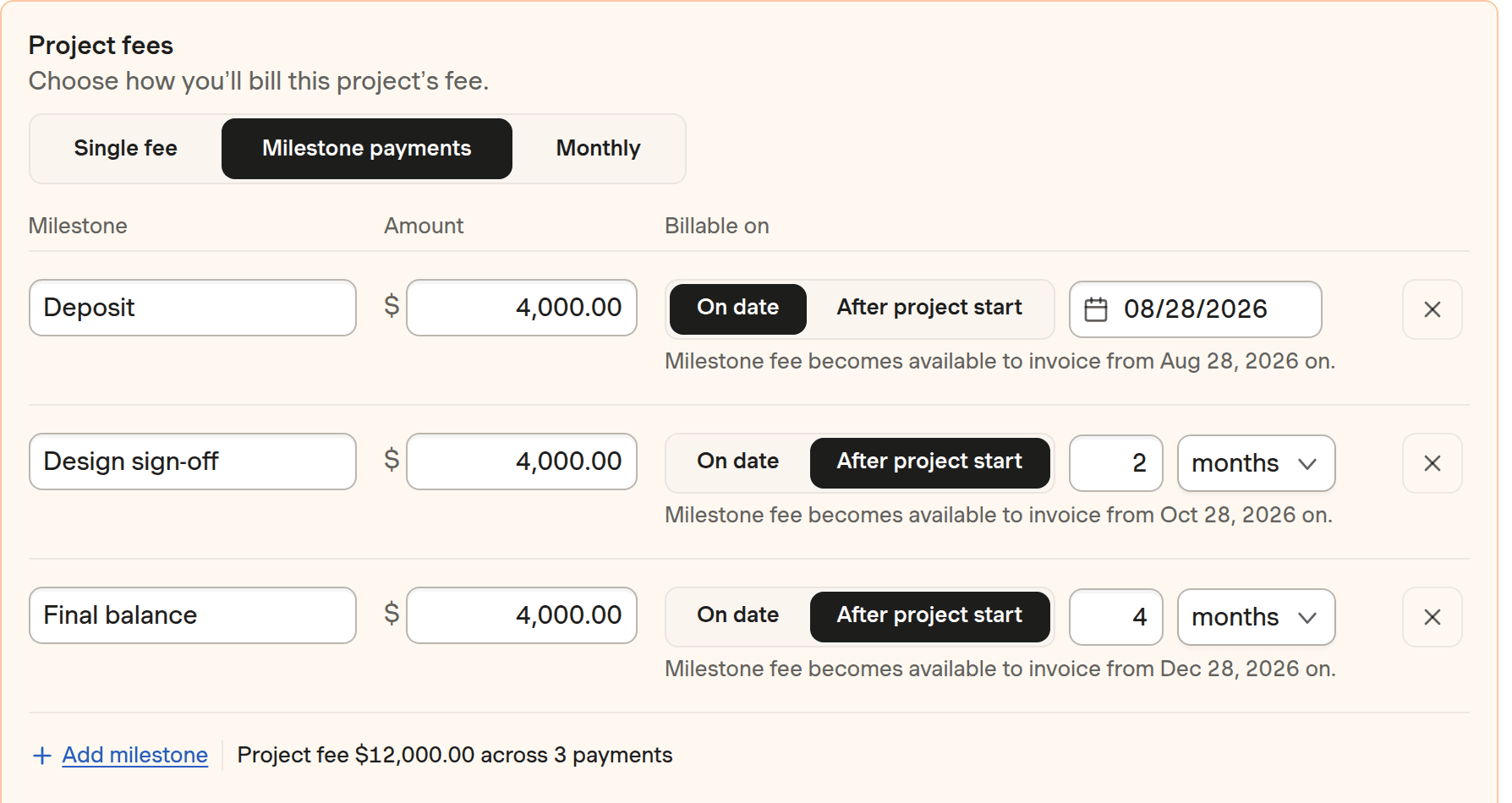
    When setting up a signed statement of work, set the project fee schedule to Milestone payments for phased deliverables or Monthly for an ongoing retainer. Defining the billing rhythm directly on the project keeps contract terms tied to daily tracking.

    The Project fees block on the milestone project's edit page.
  2. Set amounts and billable dates

    Enter the recurring monthly fee and start date for a retainer, or add named milestone rows with amounts and dates. Each milestone date can be a specific calendar day or an offset from kickoff, with the running total balancing the project fee.

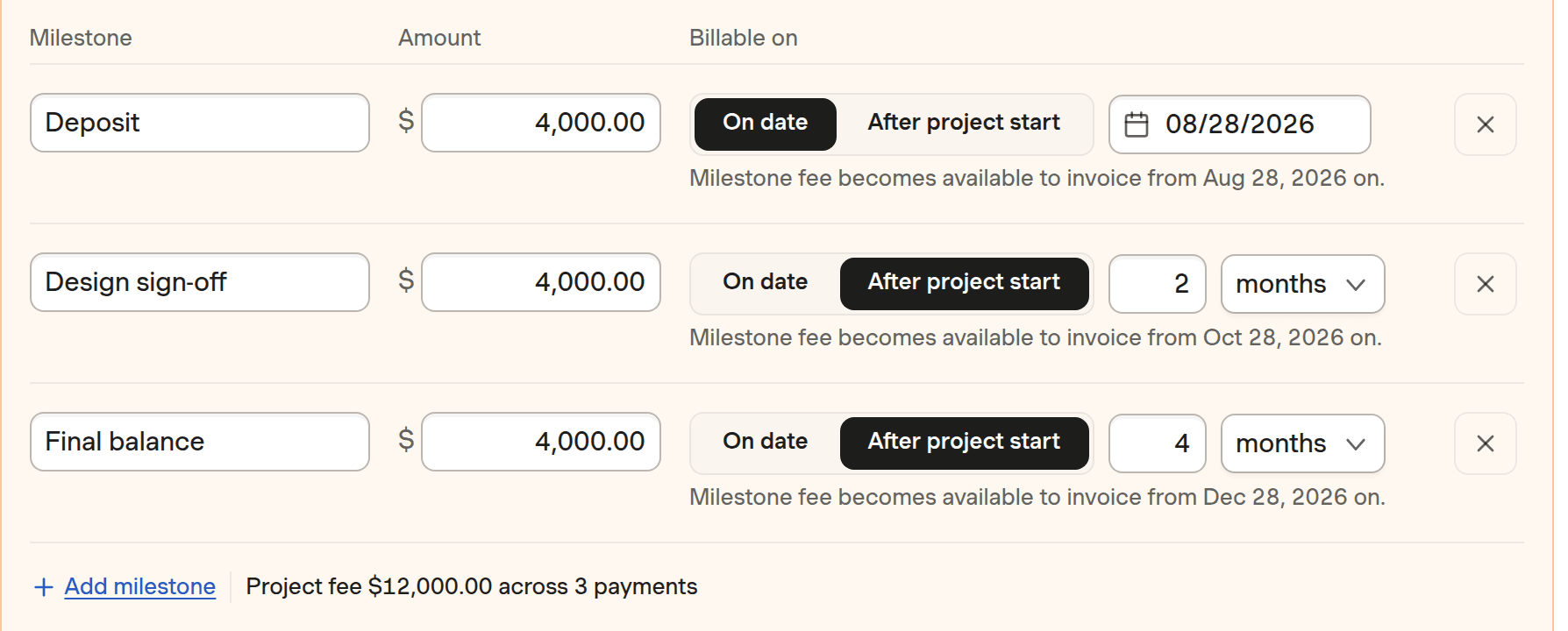
    The milestone editor with a three-payment schedule.
  3. Generate the client invoice

    Create a draft invoice when billing day arrives. Harvest identifies which milestone dates have passed and what monthly fees have accrued, adding itemized lines for amounts earned to date while leaving future milestones unbilled.

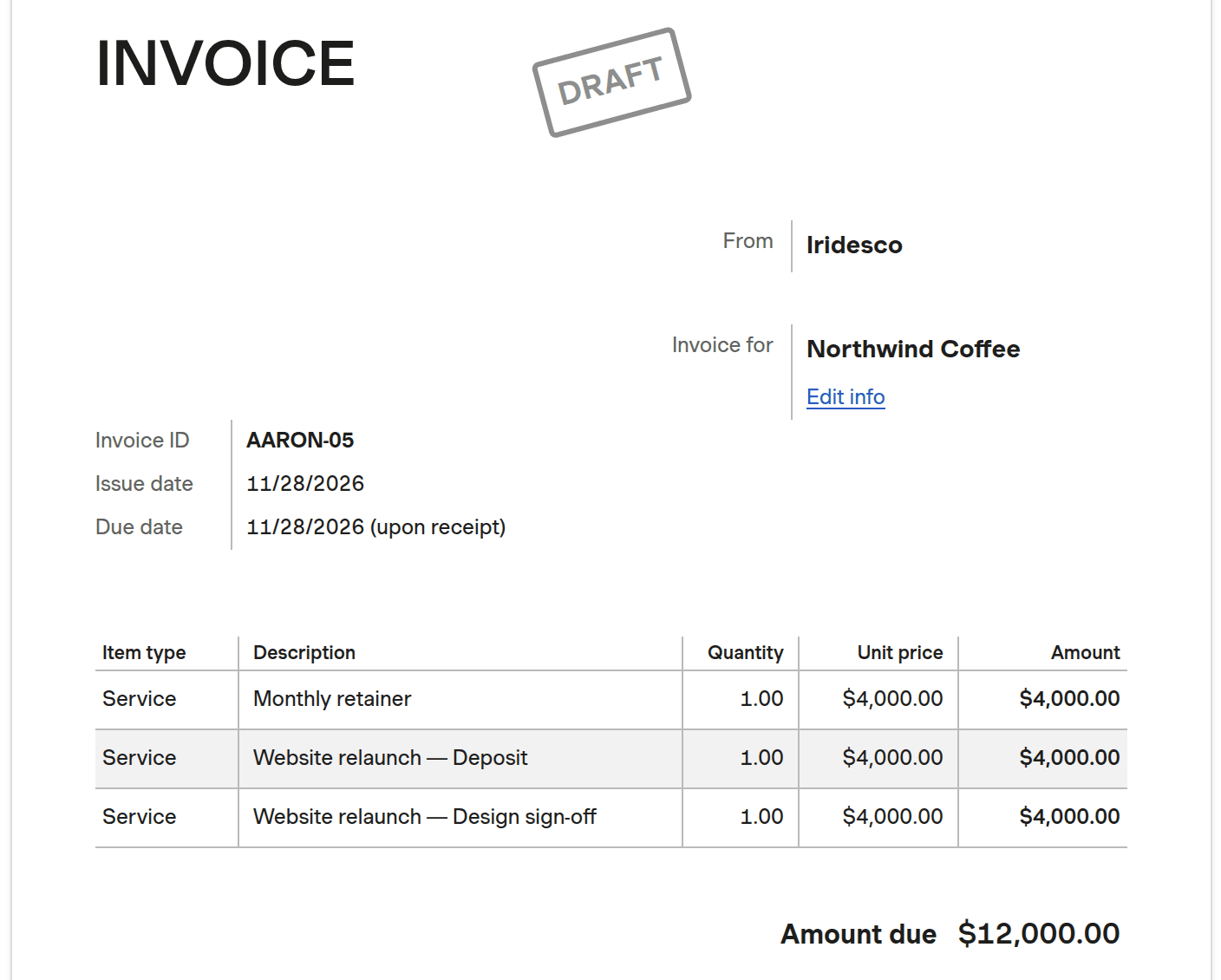
    The draft invoice built from the retainer and the staged project.

How teams manage retainers and milestones

Billing morning · creating an invoice for a mixed-contract client

Amounts due across retainers and milestones are already selected

Pre-fills due fees on the client invoice without opening signed agreements.

When drafting an invoice for a client who has both an ongoing retainer and a staged build, the project picker identifies what has accrued and pre-selects projects with fees due. The invoice builder adds the retainer’s accrued fee and any started, uninvoiced milestone whose date has arrived, while future stages remain off the draft.
A multi-project invoice drafted without checking contracts in a spreadsheet

The project picker on the new invoice page for a client with a retainer and a staged project.

Contract setup · setting payment stages on a fixed-fee SOW

Staged payments step into earned fees on their billable dates

Keeps fee totals and billing dates synchronized as project timelines shift.

Under Project fees, selecting Milestone payments brings up the schedule editor. Each installment gets a name, an amount, and a billable date, either a calendar date or an offset after project start. The running total balances against the contract fee, and each stage becomes billable only when its date arrives.

A self-accruing milestone schedule embedded directly in the project

The milestone editor with a three-payment schedule.

Invoice review · reviewing line items before dispatch

Retainer fees and project milestones appear as distinct line items

Gives clients clear visibility into the retainer balance and each due milestone they are paying for.

The generated invoice automatically populates one fixed-fee line item for the retainer’s accrued monthly catch-up alongside individual lines named for each started, uninvoiced milestone. Milestones whose billable dates have not arrived stay off the draft, keeping each invoice matched to amounts currently due.

A single transparent invoice covering two distinct billing rhythms

The draft invoice built from the retainer and the staged project.

Review drafts and protect contract terms

  • Unbilled milestones roll forward automatically

    If a milestone date passes without being invoiced, the amount remains in your uninvoiced queue. When you draft the next invoice, Harvest includes started, uninvoiced milestones oldest first so nothing is skipped or billed twice.

  • Retainer catch-up calculates from accrued time

    If an active retainer month was missed during a prior billing run, the next invoice pre-fills the total fee accrued to date minus what you already billed. You never have to manually calculate catch-up amounts.

  • Mixed contracts run as two projects on one invoice

    Because a project uses one schedule at a time, a client with an ongoing retainer and a phased build has two projects. Both schedules accrue independently, and you combine them onto a single invoice whenever you bill.

Fixed Fee Milestones

Put your next billing morning on schedule

Set up your client contracts once. On your next invoice day, open Harvest to find every due retainer fee and due milestone already waiting to be billed.