Skip to content

Extended Leave

Extended leaves are accounted for before projects get booked

Track sabbaticals, parental leave, and multi-week absences directly in Harvest. Producers see who is available on the team calendar, while approved time off shows on timesheets without distorting project budgets.

  • One request books the full multi-week span
  • Non-working days and holidays skip automatically
  • Assign tailored policies to named team members
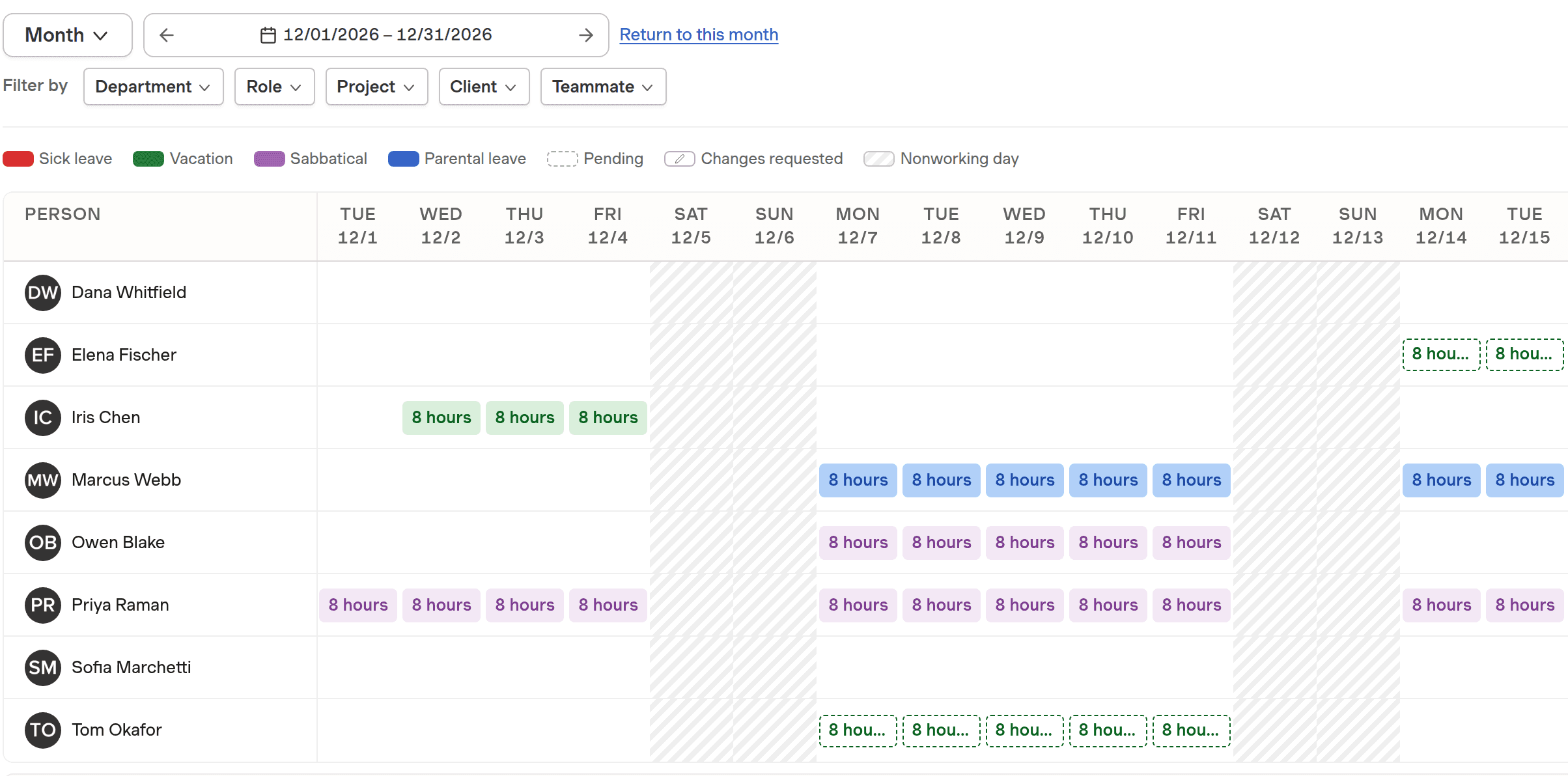
The Team calendar in Month view for December 2026, with the period control, the filter bar and the leave-type legend above the grid.

Stop reconciling absences between spreadsheets and timesheets

Tracking extended leave often means recording dates in a spreadsheet, then retyping them week after week into timesheets so the days do not look empty. Without a central calendar, answering who is out means checking with each producer in turn. In Harvest, one request books the entire span. Approved leave appears on the team calendar so the team sees confirmed availability, and displays on timesheets as informational entries that account for the time without adding to tracked hours.

Plan capacity around confirmed leave

Monday capacity planning · scheduling the quarter’s client delivery

Producers see extended absences before booking client work

Producers need to see confirmed availability before committing client dates.

Instead of cross-checking a separate spreadsheet or relying on chat reminders, producers open the team calendar. Every approved and pending leave appears across weeks and months, preventing accidental bookings across a multi-week absence.
Quarterly staffing planned around confirmed availability

The Team calendar in Month view for December 2026, with the period control, the filter bar and the leave-type legend above the grid.

A multi-month sabbatical is agreed for a senior lead

Tailored leave policies can be assigned to named team members

Individual leave arrangements do not need to be assigned to the whole company.

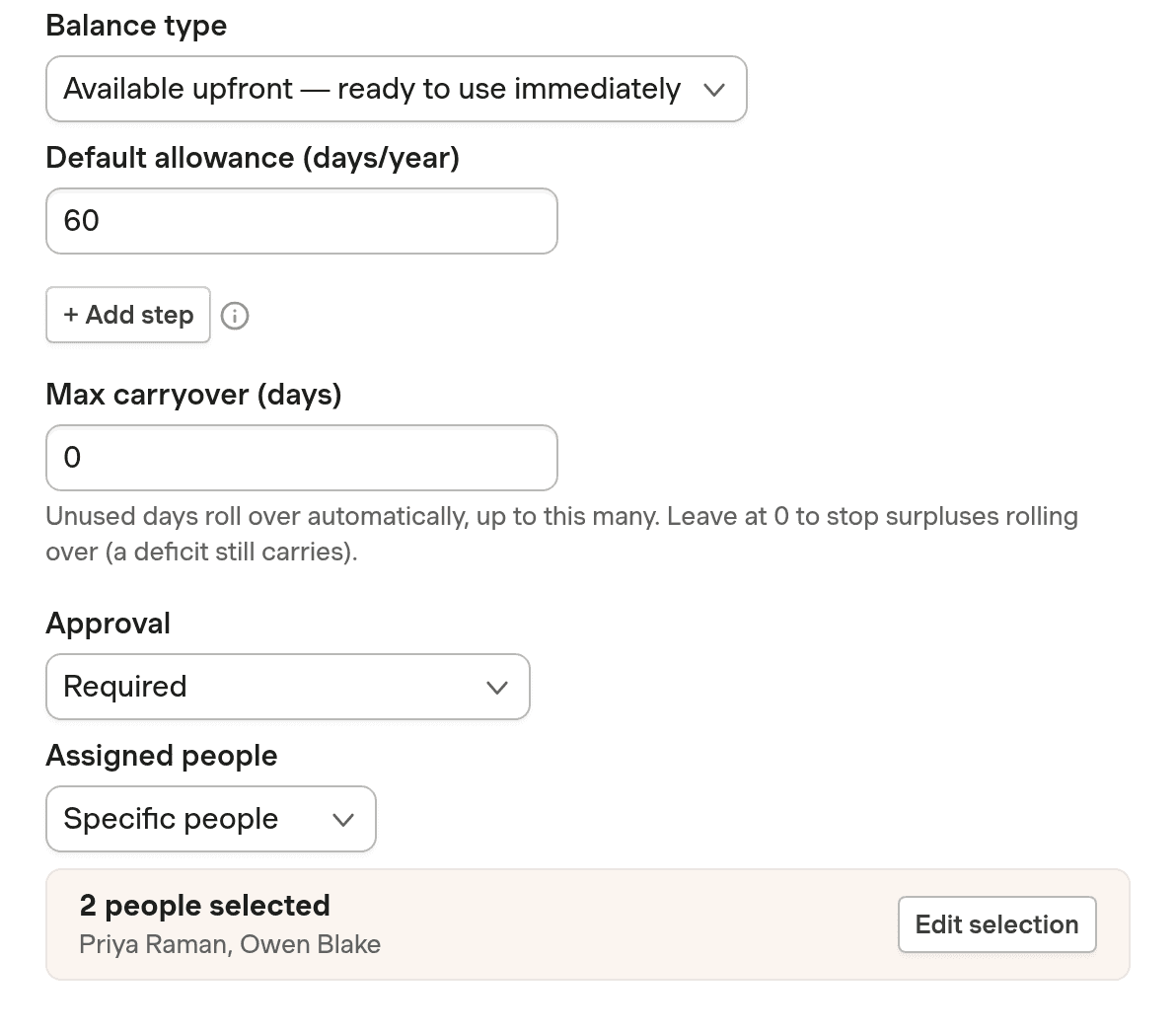
Extended leave arrangements do not need to be assigned across the entire company. Administrators assign tailored leave types, such as sabbaticals or parental leaves, to specific team members so only those people can request them, while administrators retain full booking access.

Custom leave terms managed without company-wide assignment

The time off type dialog for Sabbatical, from Balance type down to the Assigned people control.

Friday timesheet review · the second week of leave

Extended absences appear on timesheets without distorting project hours

Timesheets must explain open hours without inflating billable project totals.

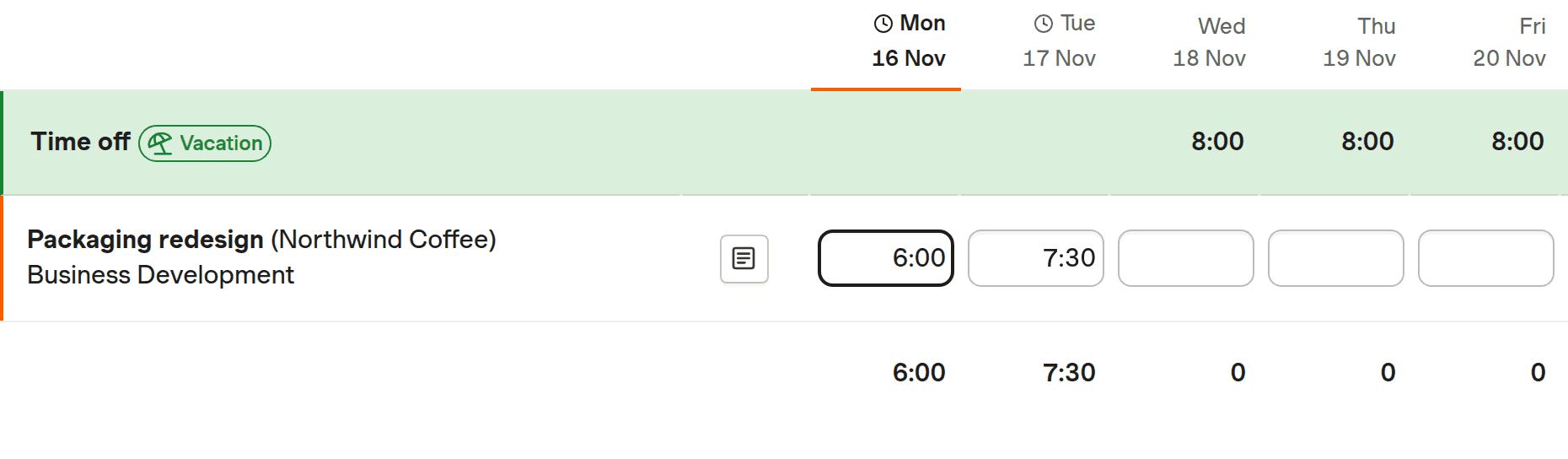
When team members are away, approved days automatically appear as informational entries on their timesheet weeks. Their absence is accounted for clearly without logging empty billable time or skewing project budgets.

Accurate timesheets with no missing gaps or dummy project entries

A timesheet week with the approved leave drawn as an informational Time off row beside a tracked project row.

How it works

  1. Request the absence span once

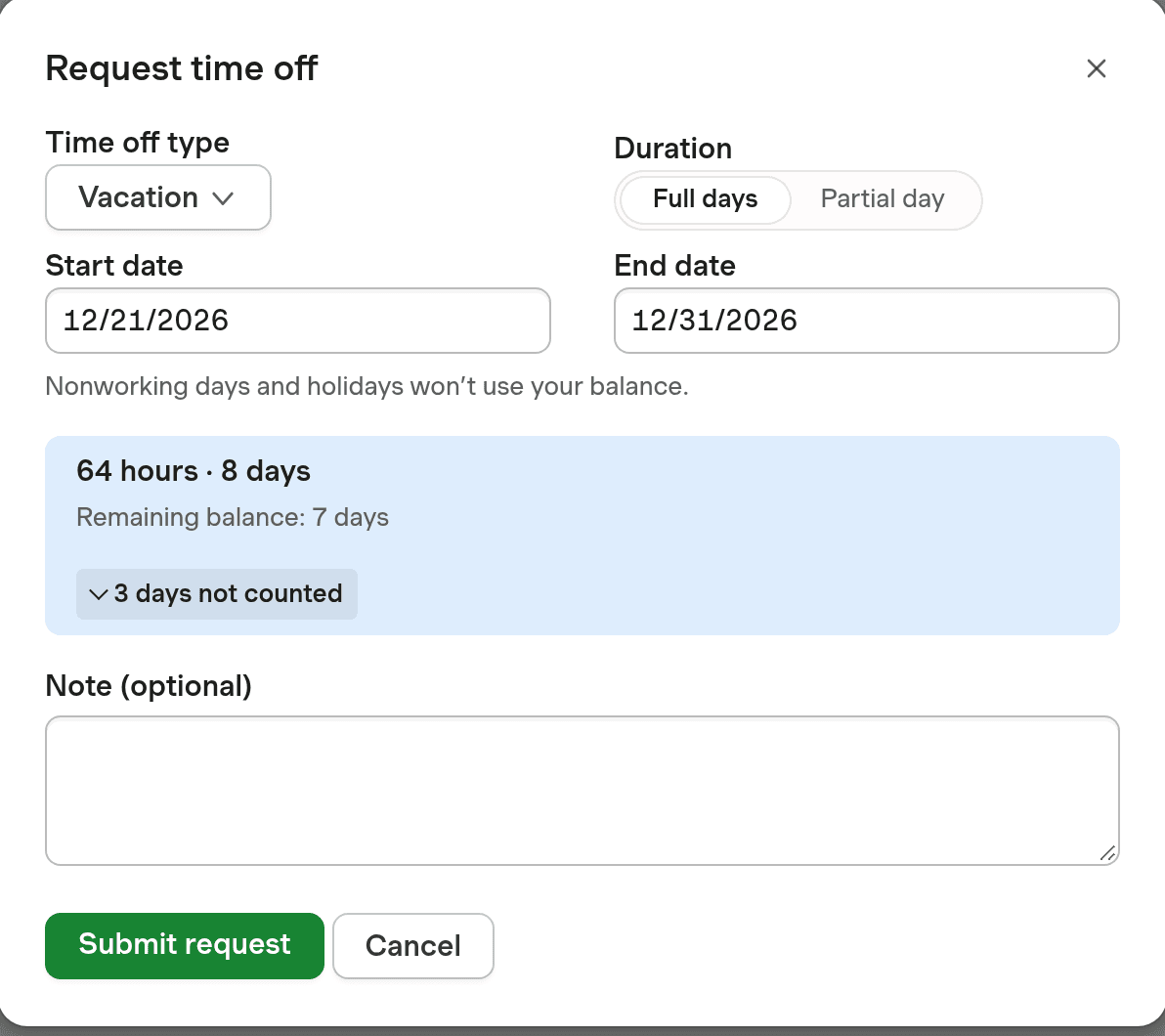
    Team members pick their leave type, select their full date span, and review an instant preview of their remaining balance. One submission reserves the entire absence, so nobody has to log recurring weekly time off requests.

    The Request time off dialog with Vacation chosen, a full-day span from 21 to 31 December and the balance preview filled in.
  2. Review and approve the dates

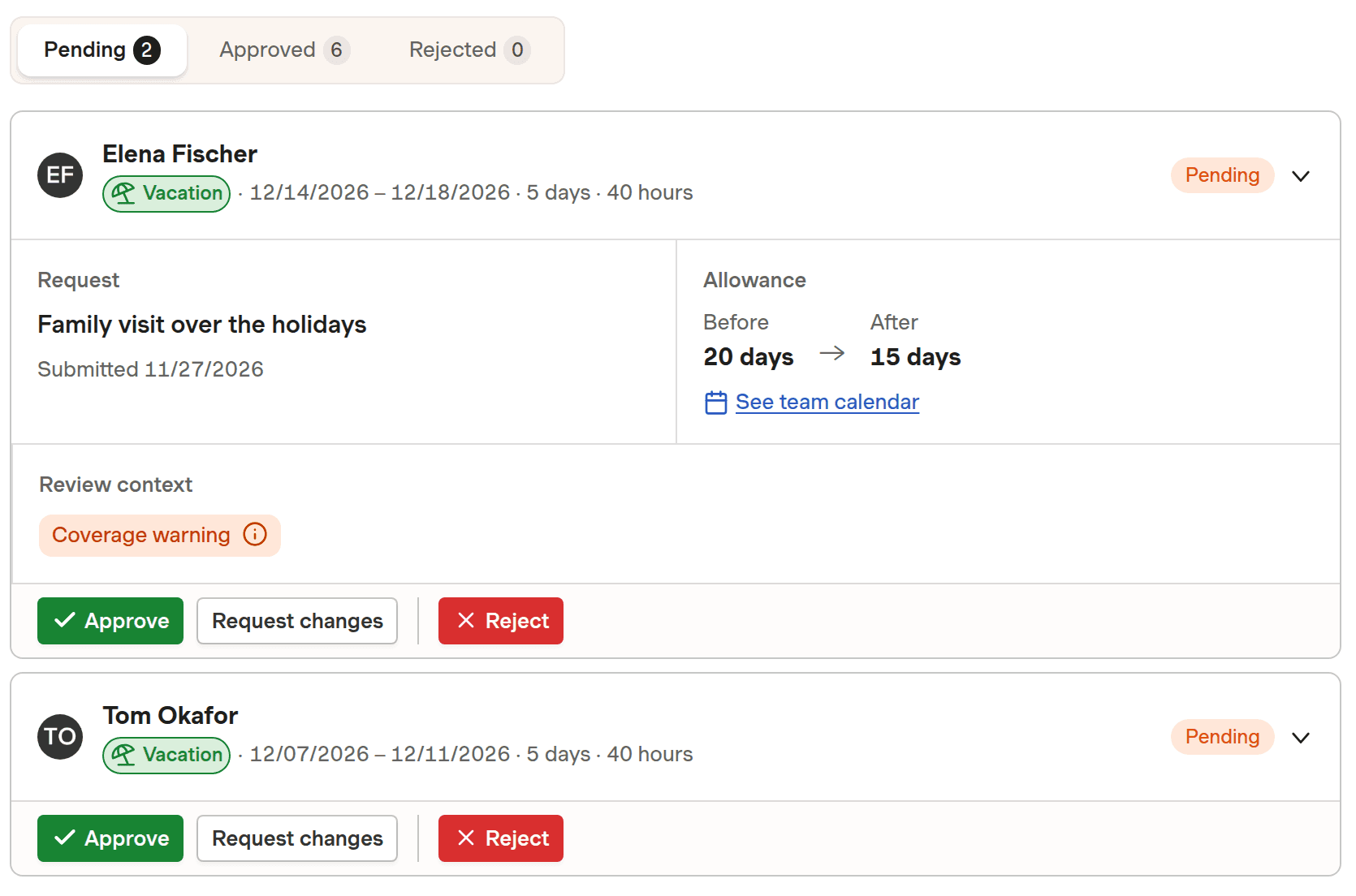
    Managers and administrators review submitted requests in the Approvals tab. Each row displays the person, the date range, total working days, and their balance after the request, making decisions fast and clear.

    The Approvals pending tab with Elena Fischer’s request expanded into its Request, Allowance and Review context panels.
  3. See absence on the team calendar and reports

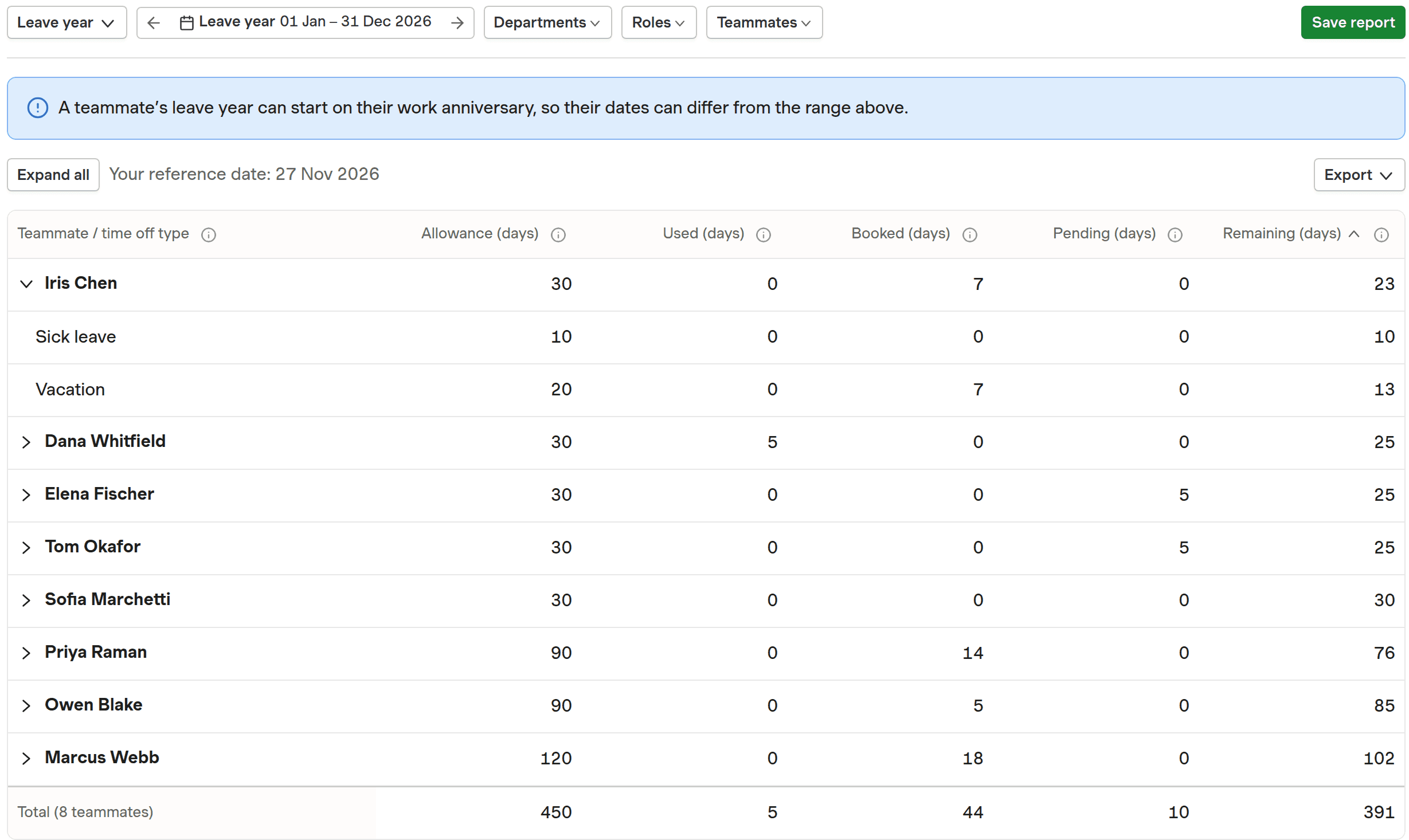
    Approved leave marks the team calendar so producers do not overbook absent teammates. The days also appear as informational entries on timesheets, while the Time off report keeps allowance and remaining balances ready for export.

    Reports → Time off for the 2026 leave year, sorted by Remaining, with Iris Chen expanded into her leave types.
  4. Configure policies for specific people

    Administrators create dedicated types for sabbaticals, parental leave, or standard time off, define whether days are available upfront or accrued, and assign policies to the whole company or named teammates.

    The time off type dialog for Sabbatical, from Balance type down to the Assigned people control.

Protected budgets, named policies, and working-day math

  • Project budgets stay untouched

    Approved leave shows as informational entries on timesheets. It accounts for an absent teammate’s week without adding tracked hours or inflating project costs.

  • Policies assigned to specific people

    When a leave type is assigned to named team members, only those members can request it. Administrators can still book any active type across the account.

  • Holidays and weekends skip automatically

    Requests calculate against each person’s work schedule and holiday calendar. You book the start and end dates once without manually removing non-working days.

Extended Leave

Plan your client delivery around confirmed availability

Start a free trial to track extended leave directly in Harvest, keep timesheets accurate without placeholder hours, and leave the side tracking spreadsheets behind.