Skip to content

Project Phases

Close completed phases to late hours and bill stages together

Run each phase as its own project to give every stage an independent budget, distinct dates and a clear cutoff when work wraps. Duplicate team rates from the Actions menu, combine unbilled stages onto one client invoice, and count toward your projects figure only in periods with tracked hours.

  • Duplicate tasks, team members and rates from the Actions menu
  • Archiving locks completed stages against new time entries
  • Combine uninvoiced balances from multiple stages onto one invoice
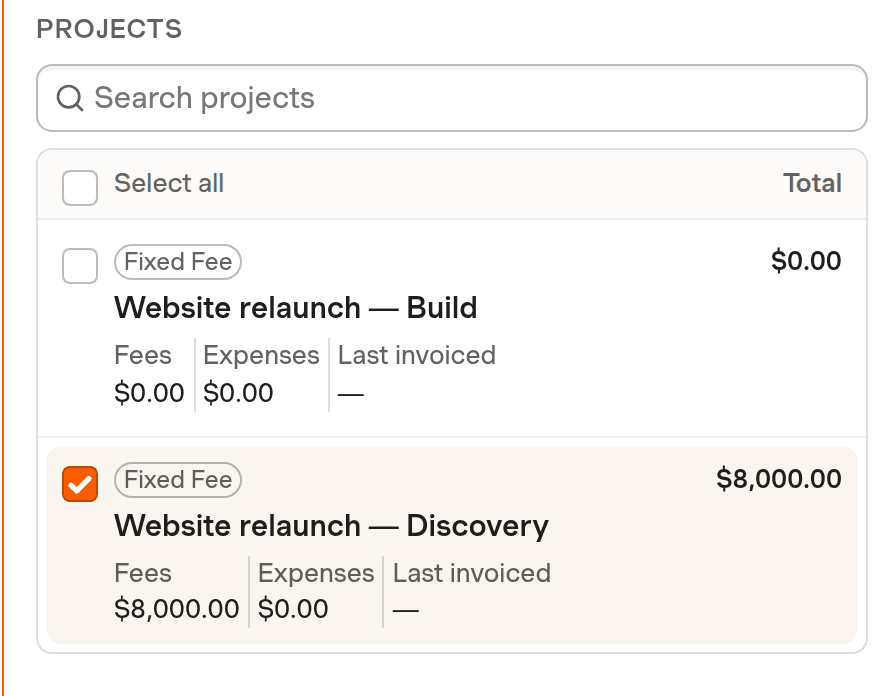
The invoice project picker for one client, listing the two stage projects with their uninvoiced amounts.

How to set up and bill project stages

Running each stage as its own Harvest project gives every phase its own budget, dates and team rates. When a stage wraps and running timers are stopped, archiving the project rejects new time entries, while uninvoiced work across active stages for the same client rolls onto a single invoice.

  1. Create the first stage as a project

    Set up the initial stage with its client, phase dates, project type, budget, tasks and assigned team members.

  2. Duplicate it for the next stage

    Open the project’s Actions menu and choose Duplicate to copy the client, tasks, people, rates and fee schedule into the new phase.

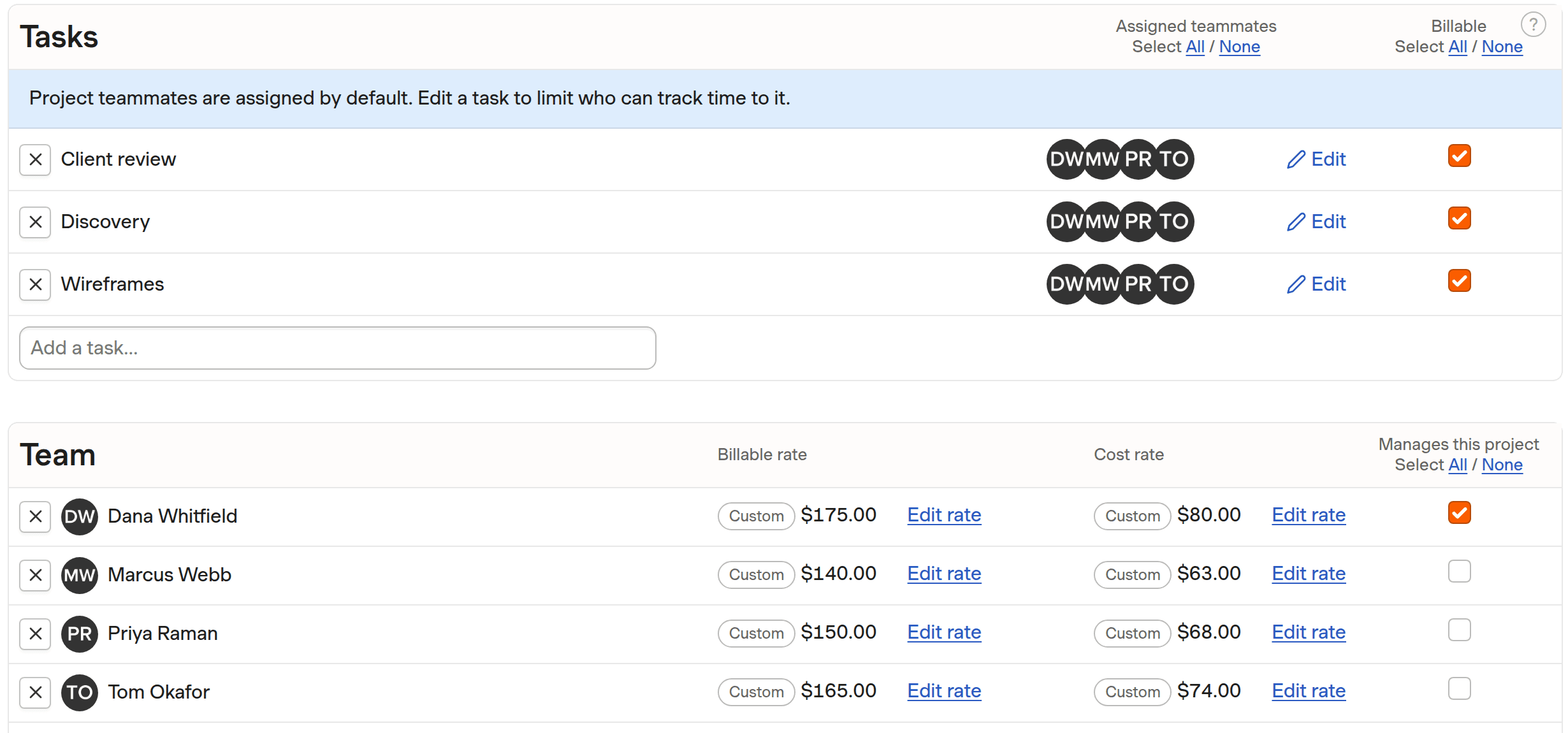
    The Tasks and Team sections of the duplicated project form, with the copied task list and the team’s billable rates already filled in.
  3. Give the stage its own budget and dates

    Enter the phase start and end dates and choose how to budget the stage, whether by project hours, hours per task, or project fees.

  4. Archive the stage that finished

    Stop any running timers and archive the completed stage. Archiving makes the project inactive and rejects new time entries.

  5. Invoice the stages together

    Create an invoice for the client and select the stage projects to bill their uninvoiced balances on a single document.

    The invoice project picker for one client, listing the two stage projects with their uninvoiced amounts.

How teams manage phased client work

The Monday after phase one ships

Completed phases lock against late timesheet entries

Lock delivered work so team timesheets stay accurate without ongoing manual audits.

Once running timers are stopped, archiving the completed stage project makes it inactive and rejects new time entries, preventing team members from logging hours to finished scope.

Closed stages reject new timesheet entries

The client asks for one invoice covering two stages

Multiple stage budgets roll onto one client invoice

Deliver a single unified monthly bill across sequential deliverables.

Creating an invoice brings up every project for that client alongside its uninvoiced balance, pre-selecting stages that have something due so unbilled deliverables roll onto a single invoice.

Uninvoiced balances combined on one client invoice

The invoice project picker for one client, listing the two stage projects with their uninvoiced amounts.

The week a signed proposal lands · three stages, one contract

Subsequent stages carry team rates without manual re-entry

Set up sequential phases while keeping team rate cards intact.

Duplicating the initial stage project copies team members, task lists, and billable rates automatically. You update the project name, code, dates and budget for the next phase.

A configured next stage with existing team rates preserved

The Tasks and Team sections of the duplicated project form, with the copied task list and the team’s billable rates already filled in.

Clear rules on project stages and billing

  • Usage counts projects with tracked hours

    Usage-based billing counts projects that have hours tracked in the billing period. A stage project with no time tracked during the period does not count toward your active project usage.

  • Independent stages without nested complexity

    Projects belong to one client and stand independently rather than nesting as subprojects. Every stage gets its own budget, start and end dates, and timesheet controls.

  • Standard project permissions apply

    Anyone on your team who can create projects can duplicate and set up stages. Setting a milestone payment schedule requires billable-rate visibility on the project.

Project Phases

Run staged client projects with clean cutoffs

Set up independent budgets and timelines for every deliverable, lock finished scope against stray timesheet entries, and invoice the entire engagement on a single bill.