Skip to content

Utilization Rate

See who hit billable targets without rebuilding the math

Harvest divides tracked and billable hours directly by each person’s working capacity. With the Time off module on, approved leave and holidays are subtracted before the division, giving you clean percentages per teammate without recalculating availability by hand.

  • Tracked and billable hours divided by working capacity
  • Leave subtracted from capacity with Time off on
  • Comparable percentages across any date range
The Time report’s Teammates tab for a full quarter.

How it works

Preparing quarterly partner reviews usually means exporting raw timesheets, cross-referencing holiday calendars and rebuilding formulas in a spreadsheet. Harvest calculates utilization automatically by dividing tracked hours by working capacity, prorated across the working days in your selected period. With the Time off module on, approved leave and company holidays come out of expected capacity first, so your reports reflect genuine working availability.

  1. Pick the period

    Choose any timeframe on the Time report, from a single week to a full quarter. Harvest prorates each teammate’s weekly capacity across the working days in that range, so weekends never dilute the percentage. You get an accurate baseline without manual calendar math.

    The Time report’s Teammates tab for a full quarter.
  2. Check the capacity breakdown

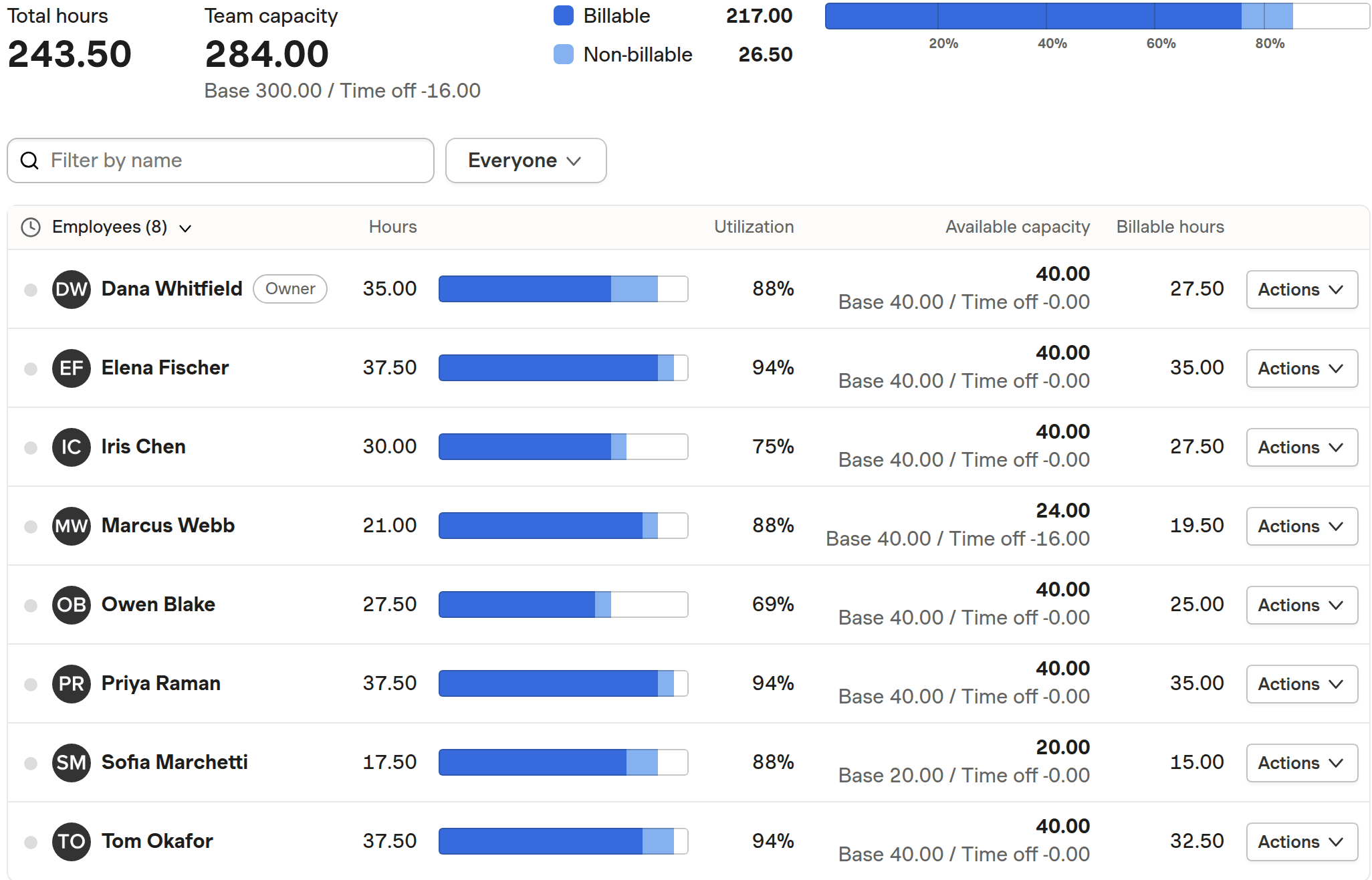
    Open the Team page to see weekly capacity broken out under the available hours figure. With the Time off module on, approved leave and company holidays come out of capacity before dividing, so teammates taking vacation are measured against the days they were available.

    The Team page’s Capacity and Utilization columns for one week.
  3. Compare billable against total

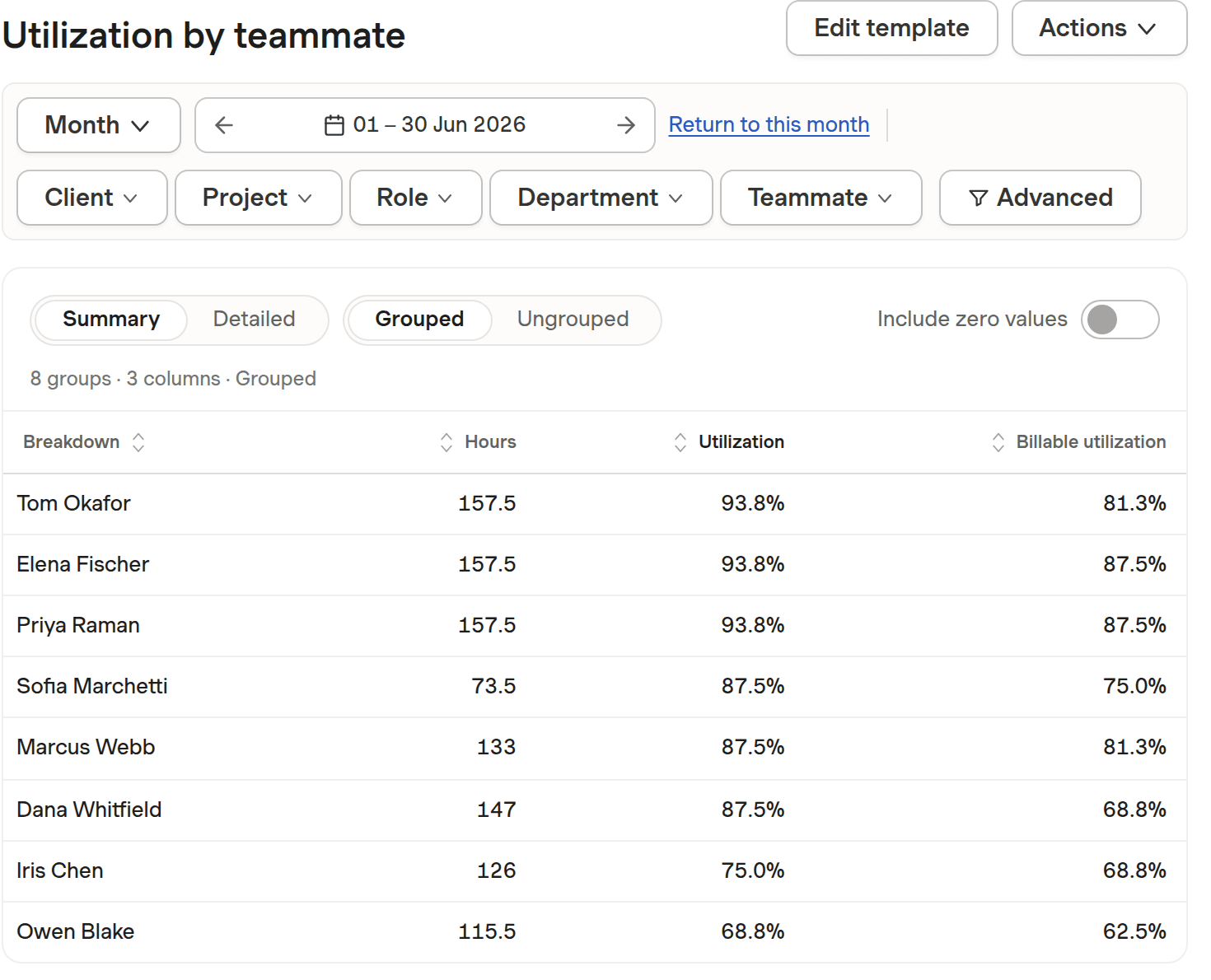
    View Billable utilization beside total utilization in a custom report grouped by teammate. Because both metrics divide by the same capacity figure, the difference between them shows the non-billable share of their time. You see whether high logged hours translated into billable client work.

    A custom report grouped by Teammate with Utilization and Billable utilization side by side.
  4. Find who is under target

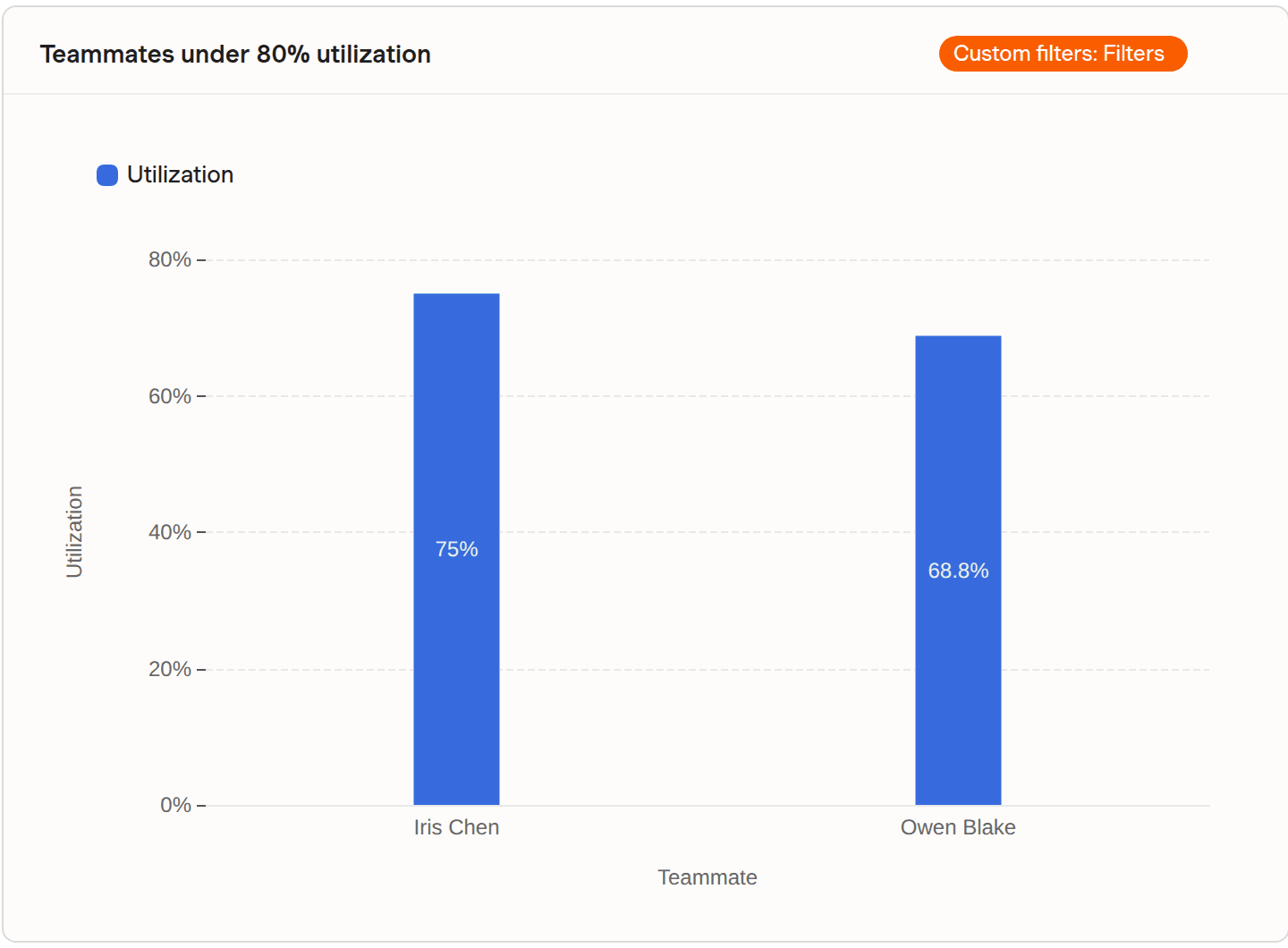
    Filter a dashboard chart to show teammates below your agency’s target, such as 80%. Instead of inspecting rows across departments, leadership immediately sees who has room for more client work. You can adjust project assignments before the quarter closes.

    A dashboard chart filtered to utilization below 80%.

What teams use it for

January · the annual billable-target review

Quarterly utilization numbers ready without manual division

Partners need quarterly billable figures without rebuilding the math in spreadsheets.

Instead of exporting timesheets to calculate who hit their 80% target, review the Teammates tab for the quarter. Every person’s tracked hours are already divided by their working-day capacity.

Every teammate’s utilization percentage ready for the review

The Time report’s Teammates tab for a full quarter.

The Monday a teammate gets back from two weeks’ leave

Approved vacation reduces expected hours when Time off is on

Scheduled vacation should not look like underperformance in team reviews.

With the Time off module on, approved leave and company holidays are subtracted directly from capacity before dividing. A teammate returning from vacation does not look underutilized because their expected hours drop to match their time off.

Fair utilization percentages that reflect true working availability

The Team page’s Capacity and Utilization columns for one week.

A partner asks whether the team is billing enough, not just busy enough

Total and billable percentages sit side by side against the same capacity

Total logged hours can mask a low billable share.

A teammate can log all their expected hours and still miss their billable targets. Reading total utilization beside billable utilization shows what share of their time went to client work versus non-billable time.

The spread between total utilization and the billable share

A custom report grouped by Teammate with Utilization and Billable utilization side by side.

Built for real schedules and permissions

  • How leave affects capacity

    With the Time off module on, approved leave and company holidays are subtracted from capacity before the division. When the module is off, capacity is not reduced by leave.

  • Scoped visibility for managers and staff

    Anyone who can open Reports sees the Time report, but rows are scoped by permission. Without permission to view all timers, a person sees only their own row or people on projects they manage.

  • Saved reports for recurring reviews

    Non-Enterprise plans can save 4 custom reports per person, while Enterprise accounts have unlimited saved reports. Reopen your quarterly review template anytime to run it against current data.

Utilization Rate

Walk into partner reviews with clean utilization numbers

Review billable pace across every teammate, with working days prorated and approved leave deducted when the Time off module is on.