What Are the Benefits of Time Tracking for Consultants?
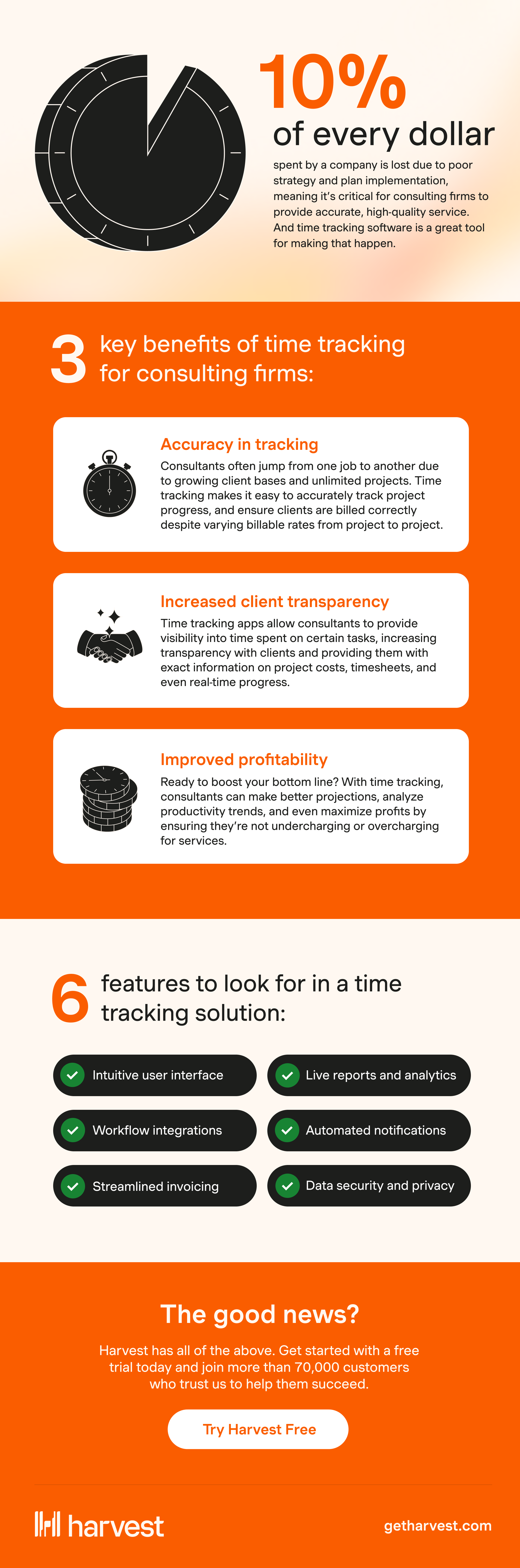
Time tracking offers substantial benefits for consulting firms, primarily in boosting billing accuracy, enhancing productivity, and improving project management. These advantages not only streamline operations but also lead to increased profitability and client satisfaction. Billing accuracy is crucial for consultants, as it ensures that every billable hour is accounted for and invoiced correctly, thereby minimizing disputes and maximizing revenue. For instance, professional services firms often lose 15-25% of billable hours due to inefficient time tracking, which can translate to significant revenue losses if not addressed.
Enhanced productivity is another key benefit. By tracking time, consultants can identify areas where productivity can be improved, such as minimizing time spent on non-billable activities or reallocating resources to high-impact tasks. This can lead to more efficient work patterns and a better understanding of how time is distributed across various projects and activities. For example, some firms have used time tracking to pinpoint where scope creep occurs, allowing them to adjust project scopes and resources more effectively.
Better project management is also a critical benefit. Time tracking provides insights into project timelines, resource allocation, and workload management. This leads to more accurate project estimates and helps prevent overruns. According to timerewards.com, firms that employ detailed time analytics can better manage scope expectations and resources, ensuring projects are completed on time and within budget. Overall, investing in a robust time tracking system can transform how consulting firms operate, leading to more predictable and profitable outcomes.
How to Choose the Right Time Tracking Solution
Choosing the right time tracking solution for your consulting firm involves evaluating key features like ease of use, integration capabilities, and reporting functionalities. A user-friendly interface is essential to ensure that all team members can easily adopt the system without extensive training. As noted by industry experts, a complicated time tracking system can lead to resistance and low adoption rates, which undermines the entire initiative.
Integration capabilities are equally important. Your time tracking software should seamlessly integrate with the other tools your firm already uses, such as project management, invoicing, and accounting systems. This integration reduces manual data entry, minimizes errors, and streamlines operations. For instance, a leading marketing firm was able to save over 4,300 hours annually by integrating its time tracking system with other internal systems, eliminating redundant data entry steps.
Additionally, robust reporting functionalities are crucial. Detailed reports provide insights into how time is allocated across different projects and clients, helping you assess profitability and make informed decisions. According to timedoctor.com, firms that leverage detailed time data can better understand their operations and identify areas for improvement. When choosing a time tracking solution, consider these features to ensure that the software will meet your firm's specific needs and enhance overall productivity.
Key Features to Look for in Time Tracking Software
When selecting time tracking software for your consulting firm, look for essential features like automated time capture, detailed reporting, and mobile accessibility. Automated time capture helps reduce human error and ensures that every minute worked is accurately recorded. This feature is particularly beneficial for consultants who juggle multiple tasks and projects throughout the day.
Detailed reporting is another must-have feature. Reports should break down time spent on different clients, projects, and tasks, providing valuable insights into where your team’s time is going. This level of detail allows you to assess the profitability of various projects and clients, helping you refine your business strategies. According to getharvest.com, detailed analytics from time tracking can reveal inefficiencies and inform better decision-making.
Mobile accessibility is crucial in today’s flexible work environment. Consultants often work from various locations, whether on-site with clients or remotely, making it vital for your time tracking software to support mobile devices. This ensures that time can be tracked consistently, regardless of where your team is working. Flexible entry methods such as start/stop timers, manual entries, and calendar-based time blocks should also be available to accommodate different work styles. By focusing on these features, you can choose a time tracking solution that enhances your firm’s efficiency and supports your business goals.
Digital vs. Paper Timesheets: What Works Best?
In the debate between digital and paper timesheets, digital solutions generally offer more efficiency and reliability for consulting firms. Digital timesheets eliminate the need for manual entry and reduce the risk of human error, providing more accurate and timely data. This is particularly important given the decline in accuracy that occurs with memory decay, which can cause a 25-40% reduction in precision just 24 hours after working on a task.
Digital timesheets also streamline the process of time tracking by allowing for real-time data entry. This capability helps prevent the common issue of forgotten tasks and ensures that all billable hours are captured accurately. In contrast, paper timesheets can be cumbersome and susceptible to errors, such as miscalculations or lost records. Furthermore, processing paper timesheets often involves additional steps like manual data entry into digital systems, which can be time-consuming and error-prone.
However, some firms still prefer paper timesheets, viewing them as simple and straightforward. Yet, in terms of scalability and integration, digital systems have a clear advantage. They can easily integrate with other business tools, such as invoicing and project management software, creating a seamless workflow from time tracking to billing. According to unizin.org, digital solutions not only improve accuracy but also provide comprehensive reporting and analytics capabilities, which are invaluable for strategic planning. Ultimately, while paper may have its place, digital timesheets are the superior choice for most consulting firms seeking efficiency and reliability.
Case Studies: Successful Time Tracking Implementation in Consulting
Implementing a robust time tracking system can significantly enhance the operations of consulting firms, driving efficiency and boosting profitability. Take, for example, a leading experiential marketing firm that managed to streamline its processes by integrating its internal time tracking system with an external one. This integration eliminated redundant data entry, saving over 4,300 hours annually and cutting costs by nearly $350,000. This case exemplifies how effective time tracking can alleviate administrative burdens and yield substantial financial benefits.
Another consulting firm used time tracking to analyze its projects and discovered a significant portion of their time was spent on smaller, less profitable clients. This insight allowed them to realign their target market, focusing on more profitable engagements. By doing so, they improved their overall return on investment. These examples underscore the importance of data-driven decisions that time tracking systems can facilitate, leading to more strategic client engagements.
Time tracking also plays a crucial role in identifying operational bottlenecks. For instance, an agency found that developers were dedicating too much time to fixing repetitive bugs. By reallocating tasks and hiring a part-time QA tester, they removed this bottleneck, which led to faster project delivery and improved profitability. According to timerewards.com, such insights from time tracking analytics are invaluable for streamlining operations in consulting firms.
Tips for Seamlessly Integrating Time Tracking into Workflows
Integrating time tracking tools into your consulting workflows can be smooth with the right approach. Start by engaging your team in the process early. Explain the benefits, such as increased efficiency and accurate billing, to get their buy-in. Addressing concerns about micromanagement by highlighting how time tracking reduces administrative burdens rather than increasing oversight can help.
Training is another critical component. Providing comprehensive training sessions ensures everyone is comfortable with the new system. Clear policies on what constitutes billable and non-billable time can prevent confusion. These policies should be communicated effectively during training to avoid inconsistencies in how time is tracked.
Adjusting processes to incorporate time tracking seamlessly is essential. Choose a system that integrates well with existing project management and invoicing tools. This integration minimizes manual data entry and errors, creating a smoother workflow. For example, systems like Harvest, which integrate with Asana and QuickBooks, help streamline the process from time tracking to invoicing. According to getharvest.com, integrations are key to maximizing the efficiency of time tracking systems in consulting firms. By following these steps, you can integrate time tracking into your workflows effectively, ensuring it becomes an asset rather than a burden.
Common Mistakes to Avoid When Choosing Time Tracking Software
Choosing the right time tracking software can be daunting, especially with the myriad of options available. One common mistake is selecting software that is too complex for your team. A system that requires extensive training for basic use is likely to discourage adoption and lead to resistance. Instead, opt for user-friendly solutions that offer intuitive interfaces.
Another pitfall is ignoring integration capabilities. Your time tracking software should seamlessly integrate with your existing tools, such as project management and accounting software. Without this integration, you risk creating silos of data that require manual reconciliation, which is both time-consuming and error-prone. For example, integrating with platforms like Trello or Xero can streamline operations and enhance data accuracy.
Focusing solely on cost can also lead to suboptimal choices. While budget considerations are important, choosing the cheapest option without considering features that meet your firm’s needs can result in inefficiencies. Consider software that offers detailed reporting and analytics capabilities, as these features can provide insights into productivity and profitability. According to unizin.org, robust analytics are essential for consulting firms to assess project efficiency and client profitability. By avoiding these common mistakes, you can select a time tracking solution that truly supports your consulting firm's goals.
Getting Started with Time Tracking: Actionable Steps
Starting with time tracking in your consulting firm involves a few key steps that lay the foundation for long-term success. Begin by selecting the right tool. Consider factors such as ease of use, integration capabilities, and the specific features that align with your firm's needs. Tools that offer flexibility in time entry methods, such as manual entry and real-time timers, cater to different work styles and can enhance user adoption.
Once the tool is selected, focus on training your staff. Comprehensive training ensures that every team member understands how to use the system effectively. It’s also crucial to establish clear policies regarding what constitutes billable and non-billable time. This clarity helps maintain consistency and accuracy in time tracking, which in turn supports precise billing.
After training, implement the system and set up processes for ongoing use. Encourage real-time time tracking, as studies show that precision decreases by 25-40% if time is logged after 24 hours. Regularly review time tracking data to identify patterns, inefficiencies, and opportunities for improvement. According to asrify.com, this proactive approach helps in refining processes and enhancing overall productivity. By following these steps, your firm can establish a successful time tracking practice that supports efficiency and profitability.
Frequently Asked Questions
What are the benefits of time tracking?
Time tracking provides visibility into work processes, helping consulting firms enhance profitability. By accurately measuring billable hours, firms can identify inefficiencies and reduce non-billable time, leading to improved project management. Furthermore, it ensures precise billing, minimizing revenue loss and fostering client trust.
How to keep track of time as a consultant?
Consultants can track time using digital tools like online timers or time-tracking software. Manually entering hours into a timesheet can also be effective. Logging every task, including calls and meetings, ensures accurate billing and maximizes revenue, allowing consultants to account for every minute spent on client work.
What is the best system for employee time tracking?
The best system for employee time tracking should be user-friendly, integrate seamlessly with existing tools, and offer real-time reporting. Look for features like automated time capture, mobile accessibility, and analytics capabilities. Popular options include Clockify, Toggl, and Harvest, which cater specifically to consulting firms' needs.
How can time tracking improve billing accuracy?
Time tracking enhances billing accuracy by providing precise data on billable hours worked. By logging time in real-time, consultants can avoid memory decay and ensure all tasks are accounted for. This leads to fewer disputes over invoices and helps maintain client trust while maximizing revenue.
What features should consulting firms prioritize in time tracking software?
Consulting firms should prioritize features like automated time entry, reporting capabilities, and integration with project management tools. Additionally, mobile access, user-friendly interfaces, and analytics for tracking productivity trends are crucial. These features help streamline workflows and improve overall efficiency in managing client projects.


