What Are ACH Payments and Why Use Them?
ACH payments, or Automated Clearing House payments, are a type of electronic bank-to-bank transfer in the United States. They function by processing transactions in batches, typically resulting in lower costs and increased efficiency for businesses. This payment method is particularly advantageous compared to traditional methods like checks or credit cards, as it often incurs lower fees and provides a more secure transaction framework.
The ACH Network has seen significant growth, handling a staggering 33.6 billion transactions valued at $86.2 trillion in 2024 alone. This growth indicates a shift in preference towards digital transactions, with ACH playing a pivotal role in this transition. For businesses, this means embracing a payment method that not only aligns with current trends but is also backed by a robust infrastructure.
One of the main advantages of ACH payments is cost savings. Typically, ACH transaction fees range from $0.25 to $1.00 per transaction, or 0.5% to 1% of the transaction value. In contrast, credit card processing fees can range from 1.5% to 3.5%, sometimes even higher. For instance, a mid-sized business processing 5,000 orders per month averaging $100 each could save between $8,750 to $13,750 monthly by switching to ACH payments, according to vericheck.com.
In addition to cost, ACH payments offer enhanced security over traditional methods. They rely on secure bank account and routing numbers and adhere to strict NACHA regulations. This makes them less susceptible to fraud compared to credit card transactions, which can be more vulnerable to data breaches and unauthorized charges. By integrating ACH payments, businesses can streamline their operations while minimizing risks.
How to Disable Credit Card Payments in QuickBooks
Disabling credit card payments in QuickBooks can streamline your payment processes and help focus on more cost-effective payment methods like ACH. Here's how you can do it step-by-step.
First, open QuickBooks and navigate to the 'Lists' menu. Select 'Customer & Vendor Profile Lists' and then choose 'Payment Method List.' Here, you'll find the list of all the payment methods currently enabled in your QuickBooks account.
Next, locate the credit card payment method you wish to disable. Right-click on it and select 'Edit Payment Method.' In the window that appears, you'll see an option labeled 'Method is inactive.' Check this box to disable the credit card payment method. Once you've done this, click 'OK' to save your changes. It's important to note that while this disables the method from being used in transactions, it may still appear in historical reports.
Finally, double-check to ensure that the method is indeed inactive. You should see an indication in the 'Payment Method List' that the credit card option is no longer active. By following these steps, you'll effectively remove credit card payments from your active payment options, allowing your business to focus on more cost-effective methods like ACH payments.
This approach not only simplifies your payment processing but also helps you avoid the complexities and costs associated with PCI DSS compliance, which is required for credit card transactions but not for ACH. According to stripe.com, this can lead to significant savings and reduced administrative burden.
Comparison of ACH vs. Credit Card Payments
When comparing ACH and credit card payments, the differences in cost, security, and processing speed are significant. ACH payments are generally more cost-effective, with fees ranging from $0.25 to $1.00 or 0.5% to 1% of the transaction value. In contrast, credit card fees can range from 1.5% to 3.5% plus interchange fees. This cost disparity makes ACH payments particularly appealing for businesses that handle large volumes of transactions.
In terms of security, ACH payments offer certain advantages. They are processed through a bank-to-bank network and are governed by strict regulations set by NACHA, ensuring secure and trustworthy transactions. Credit card payments, while also secure, can be more susceptible to fraud and require compliance with the Payment Card Industry Data Security Standard (PCI DSS), which can be costly and complex.
Processing speed is another point of differentiation. Credit card transactions are generally faster in posting, often within the same day. ACH transactions, on the other hand, typically take 3-5 business days, although Same Day ACH options have significantly reduced this timeframe, often processing within a day. This makes ACH a viable option for businesses that don't require immediate fund availability.
For businesses, the choice between ACH and credit card payments often hinges on the specific needs and transaction types. According to bankcardinternationalgroup.com, many businesses find a balanced approach to be most effective, accepting both payment methods to cater to different customer preferences and business needs.
What Are the Benefits of Using ACH Payments?
Using ACH payments offers several distinct benefits, particularly when it comes to transaction costs and security. The lower fees associated with ACH payments are a significant advantage. For example, businesses can expect fees of just $0.25 to $1.00 per transaction or a percentage fee of 0.5% to 1%, whereas credit card fees typically range from 1.5% to 3.5%. This cost efficiency makes ACH an attractive option for businesses processing large volumes of payments.
Security is another major benefit of ACH payments. They are processed through a secure network governed by the National Automated Clearing House Association (NACHA), ensuring a high level of transaction security. This reduces the risk of fraud and unauthorized transactions, making ACH payments a more secure choice compared to credit cards, which are often targets for fraud.
Additionally, ACH payments are ideal for recurring transactions. Businesses with subscription-based models or those requiring regular payments, such as utilities and insurance companies, benefit greatly from the automated nature of ACH payments. This automation not only reduces the chances of human error but also ensures consistent cash flow, which is vital for maintaining financial stability.
For companies using Harvest, integrating ACH payments can be particularly advantageous. Harvest's invoicing features easily support ACH, allowing businesses to streamline their payment processes and reduce costs. According to reliafund.com, businesses can further enhance security by implementing dual control for initiating transactions, adding an additional layer of safety to their payment processes.
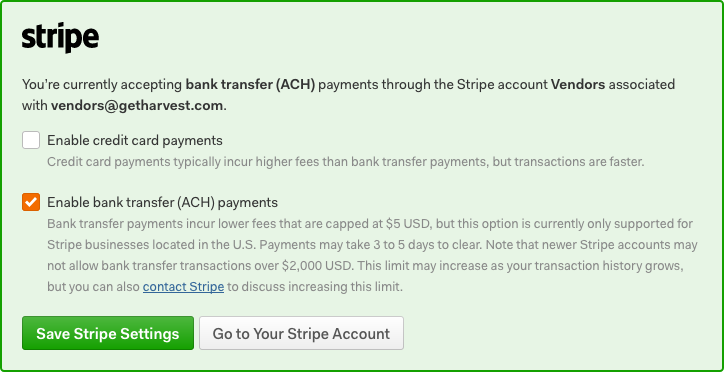
Common Mistakes When Disabling Credit Card Payments
Disabling credit card payments seems straightforward, but businesses often make common mistakes that can lead to disruptions. One of the most frequent errors is not properly communicating the change to customers. Transparency is key. If your clients aren't aware that credit card payments are no longer accepted, it can lead to confusion and frustration, potentially damaging customer relationships.
Another pitfall is failing to update internal systems and staff training adequately. When switching away from credit cards, ensure your accounting software and CRM are configured to reflect the change. Train your team on new procedures to prevent errors in financial reporting and customer interactions. This oversight can lead to operational inefficiencies and inconsistencies in data management.
Additionally, some businesses overlook the need to review their compliance obligations when disabling credit cards. For example, abandoning credit card payments might help you avoid PCI DSS compliance complexities, but you still need to ensure your new payment methods align with regulatory standards like NACHA for ACH payments. According to nacha.org, businesses must retain ACH authorizations for at least two years.
To avoid these mistakes, plan the transition thoroughly. Communicate with customers proactively, update your internal systems, and ensure compliance with all applicable regulations. By doing so, you can maintain smooth operations and continue to build trust with your clientele.
Can You Instruct Your Bank to Decline All ACH Transactions?
Yes, you can instruct your bank to decline ACH transactions, but the process requires careful consideration and understanding of the implications. Generally, you can issue a stop payment order for individual or recurring ACH transactions. This is particularly useful if you suspect unauthorized debits or want to prevent specific transactions from recurring.
However, completely blocking all ACH transactions might not be as straightforward. It's essential to check with your bank about their specific policies and procedures regarding ACH blocks. Banks usually require a written request to proceed with such measures, and this request must be submitted within a certain timeframe, typically 14 days from notifying the bank. According to fmfcu.org, once this order is in place, the ACH transactions should cease.
It's important to recognize the potential downsides of this action. Blocking all ACH transactions could inadvertently disrupt legitimate payments, such as payroll deposits or vendor payments, leading to financial and operational challenges. Thus, a more strategic approach might involve selectively blocking problematic transactions while allowing necessary ones to proceed.
Before taking action, weigh the pros and cons and discuss with your bank's representative to ensure that your decision aligns with your business's financial operations and obligations. They can provide guidance on managing ACH transactions effectively without causing unintended disruptions.
How to Update Your Payment Methods Effectively
Updating payment methods effectively involves strategic planning to minimize disruptions and ensure a seamless transition. Start by clearly defining your reasons for the update, such as reducing costs, improving security, or enhancing customer convenience. This clarity will guide your approach and communication strategy.
One crucial step is to communicate changes proactively to your customers. Explain the benefits of the new payment methods and how they enhance the customer experience. For instance, if you're transitioning from credit cards to ACH payments, emphasize the lower fees and improved security. According to vericheck.com, ACH fees are significantly lower, ranging from $0.25 to $1.00 compared to credit card fees of 1.5%–3.5%.
Ensure your team is well-prepared for the transition. This includes updating your accounting and CRM systems to accommodate the new payment methods. Training your staff on these changes will help prevent errors and ensure smooth operations.
Lastly, monitor the transition closely. Gather feedback from your customers and staff to identify any issues early on. Adjust your strategy as needed, ensuring that the new payment methods are not only integrated successfully but also optimized to meet your business goals. By taking these steps, you can avoid disruptions and enhance your payment processing capabilities.
Getting Started with ACH Payments: Actionable Steps
Getting started with ACH payments involves several actionable steps that streamline the process and align with regulatory standards. First, establish a dedicated business bank account to facilitate ACH transactions. This is crucial as ACH payments involve moving funds directly between bank accounts.
Next, select a reputable payment processor that supports ACH transactions and aligns with your business model. Many processors offer ACH services alongside credit card processing, allowing for a seamless integration into your existing systems. For businesses processing high volumes of recurring transactions, like subscriptions, ACH payments can significantly reduce costs and improve payment reliability.
To initiate ACH payments, integrate the option into your invoicing or billing system. This often involves enabling bank transfer payments on your platform, whether it’s through a website checkout or on invoices. Make sure to communicate this option to your customers, highlighting the benefits such as lower fees and enhanced security. According to bankcardinternationalgroup.com, ACH is especially effective for recurring transactions due to its lower failure rate compared to credit cards.
Finally, ensure compliance with NACHA Operating Rules by obtaining proper authorization from customers for ACH debits. This can be written, electronic, or verbal but must meet specific standards. Verifying bank account information before initiating transactions is also essential to prevent returns and associated fees. By following these steps, your business can efficiently transition to accepting ACH payments, enhancing both cost-effectiveness and operational efficiency.
Frequently Asked Questions
How do I disable credit card payments in QuickBooks?
To disable credit card payments in QuickBooks, go to the 'Edit Payment Method' section. Uncheck the 'Method is inactive' box and select OK to save your changes. This will keep the payment method visible in reports but will prevent any new transactions from being processed using credit cards.
Can you tell your bank to decline all ACH transactions?
Yes, you can instruct your bank to decline all ACH transactions. To do this, you may need to submit a written stop payment order to your bank within 14 days. This will prevent any scheduled ACH payments from being processed in the future.
What are the main differences between ACH and credit card payments?
The main differences between ACH and credit card payments include transaction fees and processing times. ACH payments typically have lower fees, ranging from $0.25 to $1.00 per transaction, compared to credit card fees of 1.5% to 3.5%. Additionally, ACH transactions can take longer to process, often 1-3 business days, while credit card transactions are usually instant.
How can I start using ACH payments for my business?
To start using ACH payments for your business, first choose a payment processor that supports ACH transactions. Next, set up an account and integrate it with your existing billing or invoicing system. Finally, inform your customers about the new payment option and provide them with the necessary details to make ACH payments.


