What Is the Best App for Tracking Time in 2026?
When it comes to selecting the best time tracking app for 2026, there are several standout options to consider. Each app offers unique features that cater to different needs, whether you are working individually or as part of a team. Some of the top contenders in the field include Harvest, Toggl, and Clockify. These apps have been noted for their ease of use, comprehensive reporting tools, and integration capabilities.
Harvest is known for its seamless integration with over 50 other platforms, such as Asana and Slack, which makes it a strong candidate for teams already using these tools. Toggl, on the other hand, is praised for its intuitive interface and detailed reporting features, which are particularly beneficial for freelancers looking to optimize their time management. Clockify stands out for its free version, which provides essential time tracking functionalities, though some advanced features, like budget management, require a paid subscription.
Pricing models vary significantly between these apps. Harvest's pricing starts at around $12 per user per month, which includes all features without hidden costs, while Toggl offers a tiered pricing structure that begins with a free basic plan. Clockify's free plan is particularly appealing for startups or small teams who need basic functionality without an upfront investment.
User ratings also provide valuable insight into the performance of these apps. According to breeze.pm, users find Harvest's detailed reporting and invoicing capabilities particularly beneficial, while Toggl is favored for its user-friendly time tracking. Ultimately, the best app for you will depend on your specific needs, budget, and the tools you are already using.
How Does Harvest Compare to Other Time Tracking Apps?
Comparing Harvest to other time tracking apps reveals its distinct advantages in certain areas, notably its robust integration capabilities and comprehensive features. Harvest integrates with a wide range of popular tools like Trello, Jira, and QuickBooks, allowing teams to seamlessly incorporate time tracking into their existing workflows. This is particularly beneficial for businesses that rely on these tools for project management and accounting.
In terms of pricing, Harvest offers transparent and straightforward plans. Starting at $12 per user per month, it provides full access to all features, which contrasts with some competitors that reserve certain functionalities for higher-priced tiers. For example, while Clockify offers a free basic plan, critical features like budget management and advanced reporting are only available in paid plans, potentially limiting its utility for larger teams.
User satisfaction is another area where Harvest shines. Across the 70,000+ teams using Harvest, the software is praised for reducing billing disputes by 25%, thanks to its precise time tracking and invoicing tools. This high level of customer satisfaction is a testament to its reliability in delivering accurate and actionable data. In contrast, some users of other apps have reported frustrations with the limitations of free plans or the complexity of more advanced features.
According to timerewards.com, effective time tracking can lead to a 30% increase in profitability. This makes choosing the right tool essential for businesses aiming to maximize their efficiency and revenue. Harvest's comprehensive suite of features and integrations positions it as a strong contender for teams looking to enhance their productivity.
Pros and Cons of Using Mobile Time Tracking Apps
Mobile time tracking apps offer significant advantages in terms of convenience and flexibility, but they also come with certain downsides. On the positive side, these apps allow employees to track their time on the go, which is particularly useful for those who travel frequently or work off-site. With mobile time tracking, there's no need to be tethered to a desktop, making it easier to capture billable hours accurately throughout the day.
However, mobile apps can also introduce some challenges, particularly concerning accuracy and security. A common misconception is that mobile time tracking is always precise, but issues such as GPS inaccuracies or manual entry errors can lead to discrepancies. Additionally, there's a potential risk of data breaches if the app does not have robust security measures in place. According to arcoro.com, automation in time tracking can reduce payroll corrections by up to 43%, highlighting the importance of choosing a reliable app.
When deciding whether to use a mobile time tracking app, consider your specific needs and work environment. If your work involves frequent travel or requires you to be in different locations, a mobile app can significantly improve your ability to manage time effectively. However, if security and data accuracy are major concerns, ensure that the app you choose has strong encryption and offers features like automatic time tracking to minimize manual errors.
In summary, mobile time tracking apps can be incredibly beneficial for improving time management and flexibility. Still, it's crucial to weigh these benefits against potential drawbacks and select an app that aligns with your operational requirements and security standards.
User Testimonials and Case Studies on Time Tracking
User testimonials and case studies provide valuable insights into how time tracking apps can significantly enhance productivity and operational efficiency. For instance, in the legal industry, accurate time tracking is crucial for revenue management as missed entries or inconsistent billing can lead to substantial financial losses. According to clio.com, adopting time tracking solutions can prevent thousands of dollars in monthly losses by ensuring precise client billing.
In creative industries, real-time tracking can reduce the inefficiencies associated with "end-of-week timesheets." Many agencies report that switching to daily tracking not only captures more accurate data but also reduces the last-minute rush, allowing for a more thorough understanding of how time is spent on both billable and non-billable activities. This shift can lead to improved project delivery timelines and a clearer picture of resource allocation.
Harvest users often share success stories about how the tool has streamlined their workflows and reduced administrative burdens. One user noted that after implementing Harvest, their team saw a 25% reduction in billing disputes, thanks to the app's detailed reporting and invoicing capabilities. This level of clarity and accuracy in time tracking helps build trust with clients and ensures that projects stay on budget.
These examples highlight the transformative impact time tracking apps can have across various sectors. By choosing a tool that fits your specific industry needs, businesses can enhance productivity, ensure compliance with billing standards, and ultimately increase profitability.
Best Practices for Effective Time Tracking
Effective time tracking is essential for maximizing productivity and ensuring accurate billing and project management. One of the best practices is to treat time tracking as a strategic tool for efficiency and accountability, rather than as a means of micromanagement. This shift in perspective can empower your team to manage their time more effectively and boost productivity.
For a practical example, consider the professional services sector, where firms can lose between 15% and 25% of their billable hours due to inefficient time tracking. By implementing effective time tracking practices, these firms can increase billable hour capture by 20-30%, significantly improving revenue without additional workload.
To start, automate repetitive data entry tasks. Automation reduces errors and saves time, allowing your team to focus on more strategic tasks. This approach is backed by data showing that automation in time tracking can reduce payroll corrections by up to 43%. Additionally, adopting user-friendly systems is crucial. Choose simple, standardized tools that are easy to use to encourage employee adoption and minimize inconsistencies.
Finally, establishing clear policies and training are fundamental. Ensure your team understands how to log hours, manage breaks, and report discrepancies. Continuous training and open communication will further support your team in effective time tracking. By following these best practices, your business can harness time tracking as a powerful tool for success.
Integration Capabilities with Other Tools
Time tracking apps like Harvest are designed to seamlessly integrate with other essential productivity tools, streamlining workflows and enhancing team efficiency. These integrations mean you can start timers directly within the tools you're already using, reducing the need for manual data entry and minimizing disruptions to your workflow.
For instance, Harvest integrates with Asana, allowing users to start a timer directly from their project tasks. This integration means your team members can track time without switching back and forth between applications, ensuring more accurate time capture and better project management. Similarly, integration with Slack allows you to start a timer with a simple command, making it easier to log time spent on various conversations and tasks.
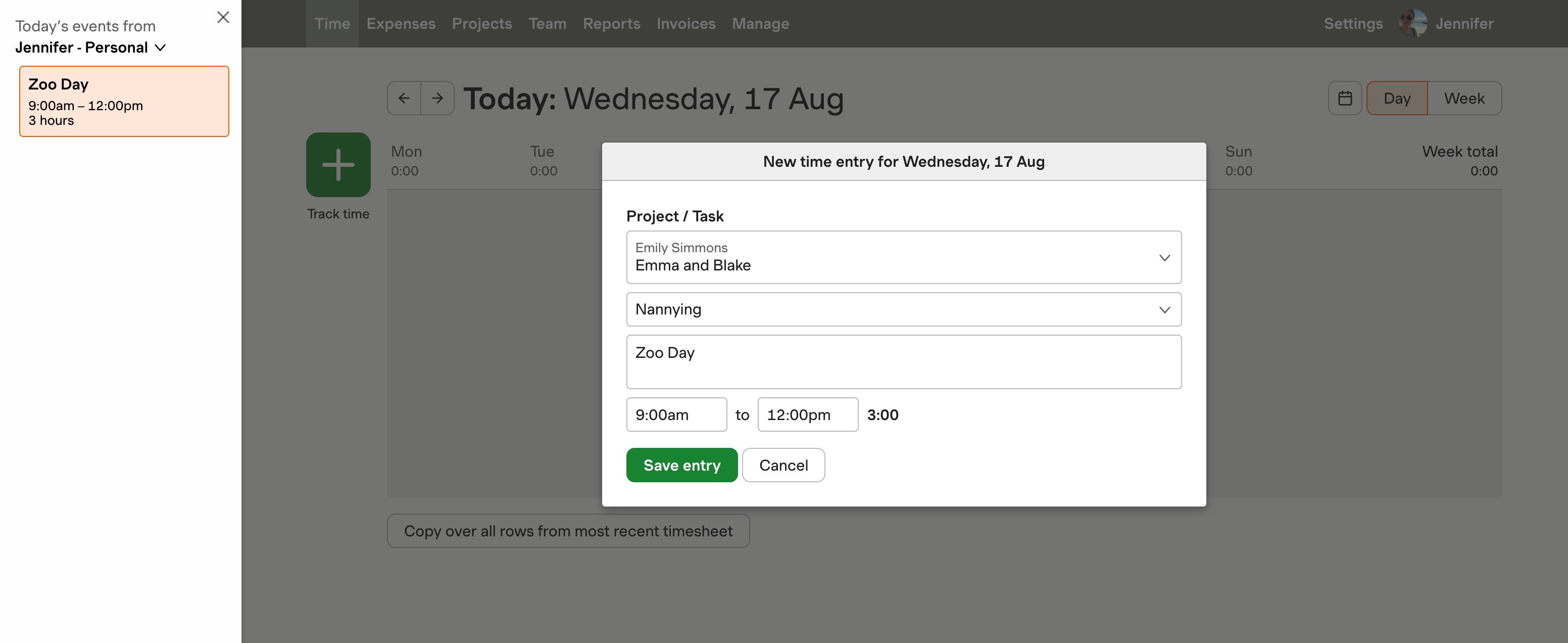
In addition to Asana and Slack, Harvest offers integrations with calendar tools like Google Calendar and Outlook, enabling you to automatically populate time entries with calendar events. This feature is particularly useful for professionals who schedule multiple meetings throughout the day, as it allows for precise tracking of time spent in each meeting without manual input.
The ability to integrate seamlessly with other business tools not only saves time but also reduces the chances of errors associated with manual time entry. By leveraging these integrations, your team can maintain focus on their core tasks while ensuring accurate time tracking, ultimately leading to improved productivity and project outcomes.
What Are the Risks of Using a Time Tracking App?
Using a time tracking app brings several potential risks, particularly concerning data privacy and security. It's crucial to address these concerns to ensure that your team's data remains secure. One major risk is the potential for data breaches, which can expose sensitive information if not adequately protected.
A common misconception is that time tracking apps are inherently insecure. However, many modern applications implement robust security protocols to protect data. For example, some apps employ end-to-end encryption and two-factor authentication to safeguard user information. It's essential to select a time tracking app that prioritizes security features to mitigate these risks effectively.
Additionally, the use of unsecured networks poses a threat. When employees track time via mobile apps, especially on public Wi-Fi, there's a risk of interception by malicious third parties. To counter this, encourage your team to use VPNs when accessing the app outside of secure networks.
Another consideration is the potential for misuse of data. Clear policies should be established to define how time tracking data will be used within your organization. Transparent communication about the purpose of time tracking can alleviate concerns and foster trust among employees. By choosing a secure app and establishing clear guidelines, you can significantly reduce the risks associated with time tracking apps. According to functionfox.com, understanding these risks and taking proactive measures is key to maintaining a secure and efficient time tracking system.
Getting Started with Your Chosen Time Tracking App
Getting started with a time tracking app doesn't have to be daunting. The key is to select a tool that aligns with your team's workflow and to set it up for success right from the beginning. Start by evaluating the features of different apps to find one that meets your needs, such as intuitive interfaces, robust reporting, and integration capabilities.
Once you've chosen an app, the first step is to familiarize your team with its functionalities. Conduct a training session to demonstrate how to log hours, manage tasks, and generate reports. This initial training is crucial to ensure everyone understands the app's capabilities and how it can benefit their daily work routine.
Next, customize the app settings to fit your specific requirements. This might involve setting up project categories, defining billable rates, and enabling integrations with other tools your team uses. A well-configured app will streamline the time tracking process, making it more efficient and less prone to errors.
Finally, establish a regular time tracking rhythm. Encourage your team to log their time daily, as this practice has been shown to significantly reduce errors and improve accuracy. Across the 70,000+ teams using Harvest, for instance, those who track time daily have 25% fewer billing disputes, highlighting the importance of consistency in time tracking.
By taking these initial steps, your team will be better equipped to utilize the app effectively, leading to improved project management and more accurate billing. For further assistance, you can explore resources such as Harvest's support center to ensure a smooth setup and ongoing use.
Frequently Asked Questions
What is the best app for tracking time?
The best app for tracking time depends on your specific needs, but popular options include Harvest, Toggl, and Clockify. These apps offer features like project tracking, reporting, and integrations with other tools, making them suitable for freelancers and businesses alike. Consider what features are most important to you, such as ease of use, automation, or team collaboration.
How does Harvest compare to other time tracking apps?
Harvest stands out for its user-friendly interface and robust features, including invoicing and expense tracking. Unlike some competitors, Harvest integrates seamlessly with project management tools, making it ideal for teams. While it offers a free trial, its paid plans may be more suitable for businesses needing advanced reporting and team management features.
What are the risks of using a time tracking app?
Using a time tracking app can pose risks like data breaches, inaccurate tracking, and reliance on technology. Mobile apps may expose users to unsecured networks, leading to potential data loss. Additionally, if employees feel monitored too closely, it can create trust issues and impact morale, so it's essential to implement these tools thoughtfully.


